Introduction
One of the most common questions from Ice Cream Calculator users is: “What’s the difference between Serving temp and Serving temp Gelato?” This guide answers that question and explains everything you need to know about predicting and controlling your ice cream’s texture at serving time.
Whether you’re making traditional ice cream for your home freezer, Italian-style gelato for a display cabinet, or recipes designed for a PacoJet or Ninja Creami, understanding these concepts will help you create consistently scoopable results every time.
In this article you’ll learn:
- Why ice cream texture depends on frozen water percentage
- How the calculator predicts serving temperatures
- How to read and use the Scoopability Bar
- How to adjust your recipes for different serving situations
The Quick Answer: Serving Temp vs Serving Temp Gelato
Before diving into the details, here’s the simple answer to the most common question:
| Data Item | What It Means | Default Setting |
|---|---|---|
| Serving temp | The temperature when your recipe reaches 75% frozen water – ideal for scooping traditional ice cream with an ice cream scoop | 75% frozen water |
| Serving temp gelato | The temperature when your recipe reaches 69% frozen water – ideal for serving gelato with a paddle (spatula) | 69% frozen water |
On the Recipe Data card in the Recipe Editor, these two values are labelled Serving Temp and Gelato Temp.
Why the difference? Gelato is traditionally served at a warmer temperature and softer texture than ice cream. A gelato paddle requires a softer product than an ice cream scoop. The lower frozen water percentage (69% vs 75%) means the gelato is softer and easier to shape with a paddle.
Both values are calculated from your recipe’s composition – specifically from the freezing curve that the calculator generates based on your ingredients.
The Key Concept: Frozen Water Percentage
The texture of ice cream isn’t determined by temperature alone – it’s determined by how much of the water in your recipe is frozen at any given temperature.
Think about it this way: two different recipes stored at -15°C might have completely different textures. One could be rock-hard while the other is perfectly scoopable. The difference comes down to their composition and how it affects the freezing behavior.
The Magic Ranges
Through extensive testing and industry experience, these frozen water percentages produce the best textures:
| Frozen Water % | Texture | Best For |
|---|---|---|
| 72-78% | Firm Scoopable | Traditional ice cream, parlor-style scoops |
| 65-72% | Soft Scoopable | Gelato, quenelle plating, restaurant service |
| 55-65% | Soft Serve | Soft serve machines, very soft service |
Below 55% the ice cream starts losing its shape. Above 78% it becomes difficult to scoop without tempering.
A Simple Way to Think About It
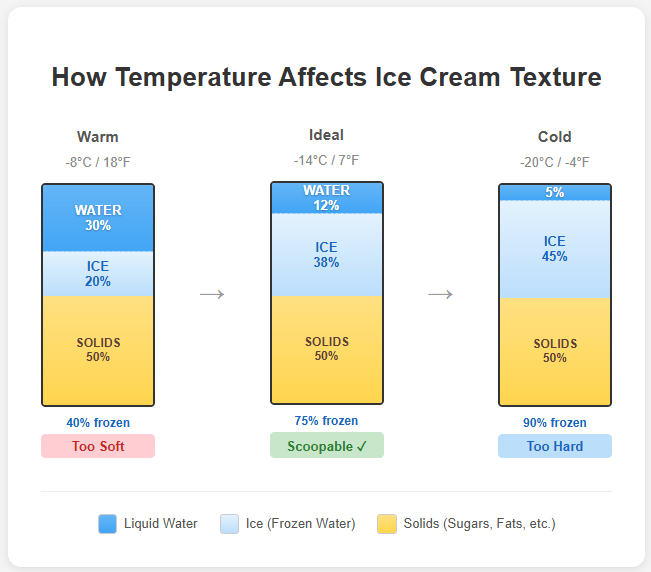
Imagine your ice cream mix as three components:
- Water (from milk, cream, fruits, etc.)
- Ice (frozen water)
- Solids (sugars, fats, proteins, stabilizers)
As temperature drops, water converts to ice. The more ice, the harder the texture. Your recipe’s ingredients determine at what temperature you reach the ideal ice percentage.
Freezing Point Depression (PAC) – The Science Behind Softness
What Is PAC?
PAC stands for “Potere Anti Congelante” (Italian for “Anti-Freezing Power”). You might also see it called AFP (Anti-Freezing Power) or FPDF (Freezing Point Depression Factor).
In simple terms: PAC measures how much your ingredients lower the freezing point of water. The higher the PAC, the softer your ice cream will be at any given temperature.
What Affects PAC?
The main ingredients that lower the freezing point are:
- Sugars – The most important factor. Different sugars have different PAC values.
- Salt – Very powerful (PAC of 585), but you can’t add much without affecting taste.
- Alcohol – Extremely powerful (PAC of 740), but affects texture and can cause iciness.
Why Different Sugars Matter
This is where the real control comes in. Different sugars have different effects on both sweetness (POD) and freezing point (PAC). The values below are the ones the calculator uses:
| Sugar | PAC | POD (Sweetness) | Notes |
|---|---|---|---|
| Sucrose (table sugar) | 100 | 100 | The reference standard |
| Dextrose | 190 | 77 | High PAC, lower sweetness – great for softening. Per gram of pure dextrose; dextrose monohydrate, the powder you buy, is about 92% dextrose, so it works out at about 175 / 71 as weighed |
| Fructose | 190 | 170 | High PAC, very sweet |
| Glucose syrup (DE42) | 80 | 48 | Per dry solids. Lower PAC, much less sweet |
| Lactose | 100 | 16 | Low sweetness, found in dairy |
The key insight: If your ice cream is too hard but already sweet enough, you can’t just add more sucrose – that would make it too sweet. Instead, replace some sucrose with dextrose. You’ll increase the PAC (making it softer) without increasing sweetness as much.
Pro tip: Using a combination of sucrose, dextrose, and fructose sugar gives you nearly complete control over both sweetness and softness independently. Note! Fructose is not the most common sugar, normally it is enough with Sucrose+Dextrose+Glucose (syrup or powder).
For the Technically Curious
The science behind PAC relates to molecular weight. Smaller molecules depress the freezing point more than larger ones. Sucrose has a molecular weight of 342 and is used as the reference.
For how sugars, salt, alcohol and milk minerals lower the freezing point, why ice cream keeps freezing as it gets colder, and how to choose sugars to make ice cream softer without making it sweeter, see Freezing Point Depression.
The Freezing Curve – Visualizing Your Recipe’s Behavior
The Freezing Curve is one of the most powerful tools in Ice Cream Calculator. It shows exactly how much water is frozen at every temperature, letting you predict your ice cream’s texture from the moment it leaves the machine until deep freeze storage.
How to Access the Freezing Curve
The Freezing Curve opens as its own page, and you open it from the Recipe Editor:
- Desktop: click the Freezing button in the sidebar beside the chart, below Data and Nutrition.
- Mobile: tap the Freezing Curve icon (a small line chart) in the row of buttons below the chart.
- Freezing Curve card: if you have added this card to your editor layout, click its expand icon (Open the full freezing curve).
Click Back to Recipe to return to the editor. Recipe View has no link to the freezing curve.
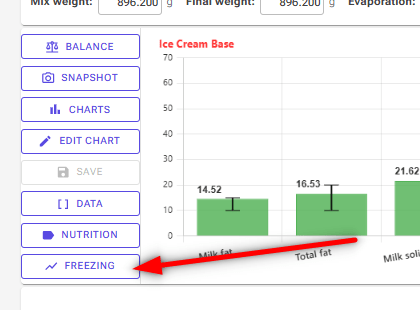
The optional Freezing Curve card shows a smaller version of the same chart directly in the editor, with the serving zone and the ice cream and gelato points. You add it, like any other card, with Customize layout in the Recipe Editor.
Reading the Chart
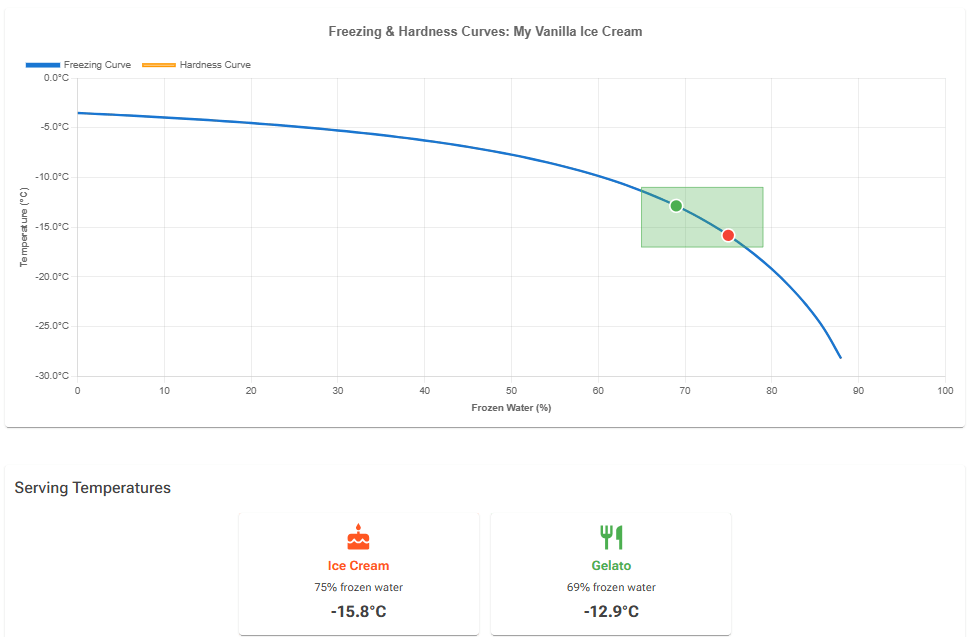
The chart shows frozen water (%) along the bottom and temperature up the side. It displays several curves:
- Freezing Curve – The main curve showing percentage of water that’s frozen at each temperature
- Hardness Curve – Similar to frozen water but adjusted for ingredients like chocolate and nuts that make ice cream harder
- Optimal Serving Zone – A green box covering 65–79% frozen water between -17°C and -11°C. Where your curves pass through it, the recipe is in a good serving range
Key Points on the Curve
The chart marks two important serving temperatures:
- Ice Cream serving temp – Where your recipe reaches your target frozen water % for ice cream (default 75%)
- Gelato serving temp – Where your recipe reaches your target frozen water % for gelato (default 69%)
Each serving temperature is the average of two readings at the target frozen water %: the temperature on the freezing curve and the temperature on the hardness curve. For a recipe without chocolate or nuts the two curves are almost the same.
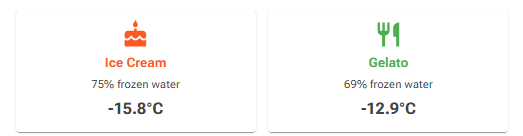
Below the chart, three cards show the results:
- Ice Cream – your ice cream target (for example 75% frozen water) and its serving temperature
- Gelato – your gelato target (for example 69% frozen water) and its serving temperature
- Freezing point – the initial freeze temperature, where the first ice forms
At the bottom of the page, the Freezing Curve Data table lists the temperature in °C and °F for every 1% of frozen water from 0% to 80%, read from the freezing curve.
The Hardness Curve and Chocolate/Nuts
Some ingredients affect hardness beyond just freezing point depression. Chocolate and nuts contain cocoa fat, cocoa solids, and other fats that make ice cream harder even at the same frozen water percentage.
The calculator handles this with a Hardening Factor (HF) that adjusts the hardness curve. This is why chocolate ice cream at -14°C feels harder than vanilla at the same temperature, even if they have similar PAC values.
Temperature Settings in the Calculator
The Settings page contains two groups of temperature-related settings that work together but control different things.
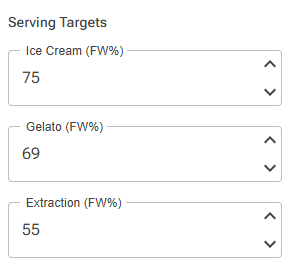
Serving Targets (Frozen Water Percentages)
These settings control what frozen water percentage the calculator uses when calculating serving temperatures:
| Setting | Default | What It Controls |
|---|---|---|
| Ice Cream (FW%) | 75% | The “Serving temp” data item |
| Gelato (FW%) | 69% | The “Serving temp gelato” data item |
| Extraction (FW%) | 55% | The “Extraction temp” (when to pull from the machine) |
When to adjust these:
- If you prefer a slightly firmer or softer serving texture, adjust by 1-2%
- For professional gelato cabinets, some prefer 65-68% for even softer service
- Generally, keep these at defaults unless you have specific needs
Scoopability Markers (Display Temperatures)
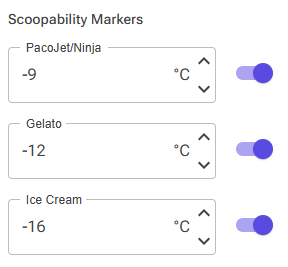
These settings control the Scoopability Bar in the Recipe Editor – specifically which temperature markers appear and at what temperatures:
| Setting | Default | What It Shows |
|---|---|---|
| PacoJet/Ninja | -9°C (16°F) | Texture after spin processing |
| Gelato | -12°C (10.4°F) | Typical gelato cabinet temperature |
| Ice Cream | -16°C (3°F) | Typical hard ice cream serving temperature |
Each marker has an on/off toggle, so you can show only the markers relevant to your work.
When to adjust these:
- If your gelato cabinet runs at -13°C instead of -12°C, change the Gelato marker
- If your home freezer is colder than -16°C, adjust the Ice Cream marker
- PacoJet/Ninja users might adjust based on their actual measured temperatures
The Scoopability Bar – Quick Texture Assessment
The Scoopability Bar in the Recipe Editor gives you an instant visual assessment of your recipe’s texture at key temperatures.
It lives in the Scoopability card. In the default layout the card sits directly below the chart, and you can move it with Customize layout. The card appears once you have a chart, and next to the bar it has a POD box that shows the recipe’s sweetness, with its own − and + buttons.
Understanding the Bar

The bar shows a gradient from Soft (left) to Hard (right), representing frozen water percentages from about 50% to 90%.
The color zones:
- Red (left) – Too soft, ice cream won’t hold its shape
- Green (center) – Ideal scooping range
- Red (right) – Too hard, difficult to scoop
The Triangle Markers
Up to three triangle markers appear above the bar, each showing the frozen water percentage at a specific temperature:
- PacoJet/Ninja marker – Shows texture at -9°C (or your custom temperature)
- Gelato marker – Shows texture at -12°C (or your custom temperature)
- Ice Cream marker – Shows texture at -16°C (or your custom temperature)
Hover over the bar to see the frozen water percentage and texture classification at any point.
The +/- Buttons
The small − and + buttons to the right of the bar perform quick PAC balancing:
- − (minus) = Make softer (increase PAC)
- + (plus) = Make harder (decrease PAC)
Each click moves the recipe’s PAC by about 3 units. To get there, the balancer may change every unlocked ingredient by up to ±5% of its current weight, not only the sugars, while it keeps total fat, total solids, total sugars and sweetness (POD) close to their current values. The mix weight stays the same. A chart must be selected in the editor for the buttons to work.
- Locked ingredients and add-ins are never changed.
- Ingredients you have classed as Stab, Emul, Fib or HIS in the Balance dialog keep the ranges of those classes.
- An ingredient with its own amount range keeps that range.
The − and + buttons in the POD box work the same way for sweetness: − makes the recipe less sweet and + sweeter, about 3 POD units per click, while PAC and the other values are held close to where they are.
Important! Lock ingredients whose weight you don’t want to change, like flavors and stabilizers, before you click.
How to Use It
Scenario 1: Making ice cream for your home freezer
- Look at the Ice Cream marker (-16°C)
- If it’s in the green zone, your recipe should be scoopable after brief tempering
- If it’s in the red zone on the right (too hard), use the − button to soften or re-balance the recipe
Scenario 2: Making gelato for a display cabinet
- Look at the Gelato marker (-12°C)
- Aim for the marker to be in the green zone
- All your gelato flavors should have markers in similar positions for consistent cabinet display
Scenario 3: Making recipes for PacoJet or Ninja Creami
- Look at the PacoJet/Ninja marker (-9°C)
- This shows the expected texture after one spin cycle
- For restaurant quenelle service, aim for the soft-scoopable range (65-72%)
Practical Guidelines by Serving Style
Traditional Ice Cream (Home Freezer)
Target: 72-78% frozen water at serving temperature
| Situation | Temperature | Notes |
|---|---|---|
| Storage | -18°C to -20°C | Most home freezers |
| Serving | -14°C to -16°C | After 5-10 minutes tempering on counter |
Tips:
- Aim for a “Serving temp” between -13°C and -16°C at 75% frozen water
- If your freezer is very cold (-20°C or below), you’ll need more tempering time
- Don’t suppress the freezing point too much – the ice cream will melt faster when served
Gelato (Display Cabinet)
Target: 65-72% frozen water at serving temperature
| Situation | Temperature | Notes |
|---|---|---|
| Cabinet display | -12°C to -14°C | Varies by cabinet |
| Ideal for paddle | -12°C | Soft enough to shape |
Tips:
- Aim for a “Serving temp gelato” that matches your cabinet temperature
- All flavors should have similar PAC values for consistent texture in the cabinet
- Chocolate and nut flavors need higher PAC to compensate for hardening
PacoJet / Ninja Creami
Target: 62-70% frozen water after processing
| Situation | Temperature | Notes |
|---|---|---|
| Storage before spin | -20°C to -22°C | Deep freeze for pacotizing |
| After first spin | -9°C to -10°C | Ready for service |
Tips:
- These machines spin frozen blocks and generate heat during processing
- The final temperature is warmer than storage – plan accordingly
- For quenelle-style plating, aim for 65-70% frozen water at -9°C
- Higher PAC recipes work well because they’re designed to be soft at warmer temps
Troubleshooting Common Issues
“My ice cream is rock hard straight from the freezer”
Causes:
- PAC is too low
- Freezer temperature is very cold
- Not enough tempering time
Solutions:
- Check the Scoopability Bar – is the Ice Cream marker in the red (hard) zone?
- Use the − button to balance for higher PAC or re-balance the recipe
- Replace some sucrose with dextrose to soften without adding sweetness
- Allow more tempering time (10-15 minutes on counter)
“My ice cream is too soft and melts too fast”
Causes:
- PAC is too high
- Too much alcohol or salt
- Freezing point is suppressed too much
Solutions:
- Check if the Scoopability Bar markers are in the red (soft) zone
- Use the + button to balance for lower PAC or re-balance the recipe
- Reduce or remove alcohol from the recipe
- Consider whether you’ve added too much salt
“Different flavors have different textures in my display cabinet”
This is one of the most important reasons to use a calculator! In a gelato cabinet, all flavors should scoop equally well.
Solution:
- Check the “Gelato Temp” (Serving temp gelato) for each recipe
- Adjust PAC so all recipes have similar serving temps
- Remember: chocolate and nut recipes need higher PAC to compensate for hardening
“My recipe’s serving temp seems too high/low”
Possible issues:
- Incorrect ingredient PAC values
- Missing or incorrect sugar data in ingredients
- Very unusual recipe composition
What to check:
- Verify PAC values for your ingredients, especially custom ones
- Make sure all sugar-containing ingredients have correct PAC and sugar content
- Use the PAC/POD tool to estimate values if unsure
“Should I add alcohol to soften my ice cream?”
This is common advice, but usually unnecessary if you understand sugar balancing.
The trade-offs of alcohol:
- ✓ Very effective at lowering freezing point
- ✗ Doesn’t contribute to body or texture
- ✗ Can make ice cream icier with larger ice crystals
- ✗ Accelerates the freeze-thaw cycle damage
Better approach: Use a combination of sugars (sucrose + dextrose + glucose) to control both sweetness and softness without the downsides of alcohol.
Related Topics
- Balancing – Learn how to use the balancing tools to adjust PAC and other properties
- Charts – Understanding chart properties and creating custom balance targets
- Settings – Change the frozen water targets and the scoopability marker temperatures
- Recipe Data Calculation System – How the calculator works out serving temperatures, PAC, POD and the other recipe values
- Sugar Composition – The individual sugars in your ingredients and what each one adds to sweetness and softness
- Glucose and Dextrose Explained – Glucose syrup, glucose powder, DE and dextrose
- Display Case – See which flavors are ideal, too hard or too soft at your cabinet temperature
- Tools overview – Includes the Spin Machine Calculator for PacoJet and Ninja Creami
- PAC and POD Calculation – How to calculate PAC and POD for custom ingredients (links to article written for the desktop version)