Where to Find the Tools
Open Tools in the main menu. The page has three parts: the calculation and planning tools at the top, then Import and Export. Click a card to open the tool. Cards with a Premium Feature chip need Premium, and a few other tools check for Premium when you open them; each tool below says what it needs.
- Free means no Premium is needed. A calculation tool marked Free, without "signed in", also works without an account, as a guest.
- Signed in means you need a free account.
- Premium means you need a Premium subscription; see Account, Premium and Your Data.
Most tools can also be added to your Home page as shortcuts (see Introduction). Some open from the Recipe Editor with the current recipe already loaded, and a few exist only in the editor; see Tools in the Recipe Editor at the end.
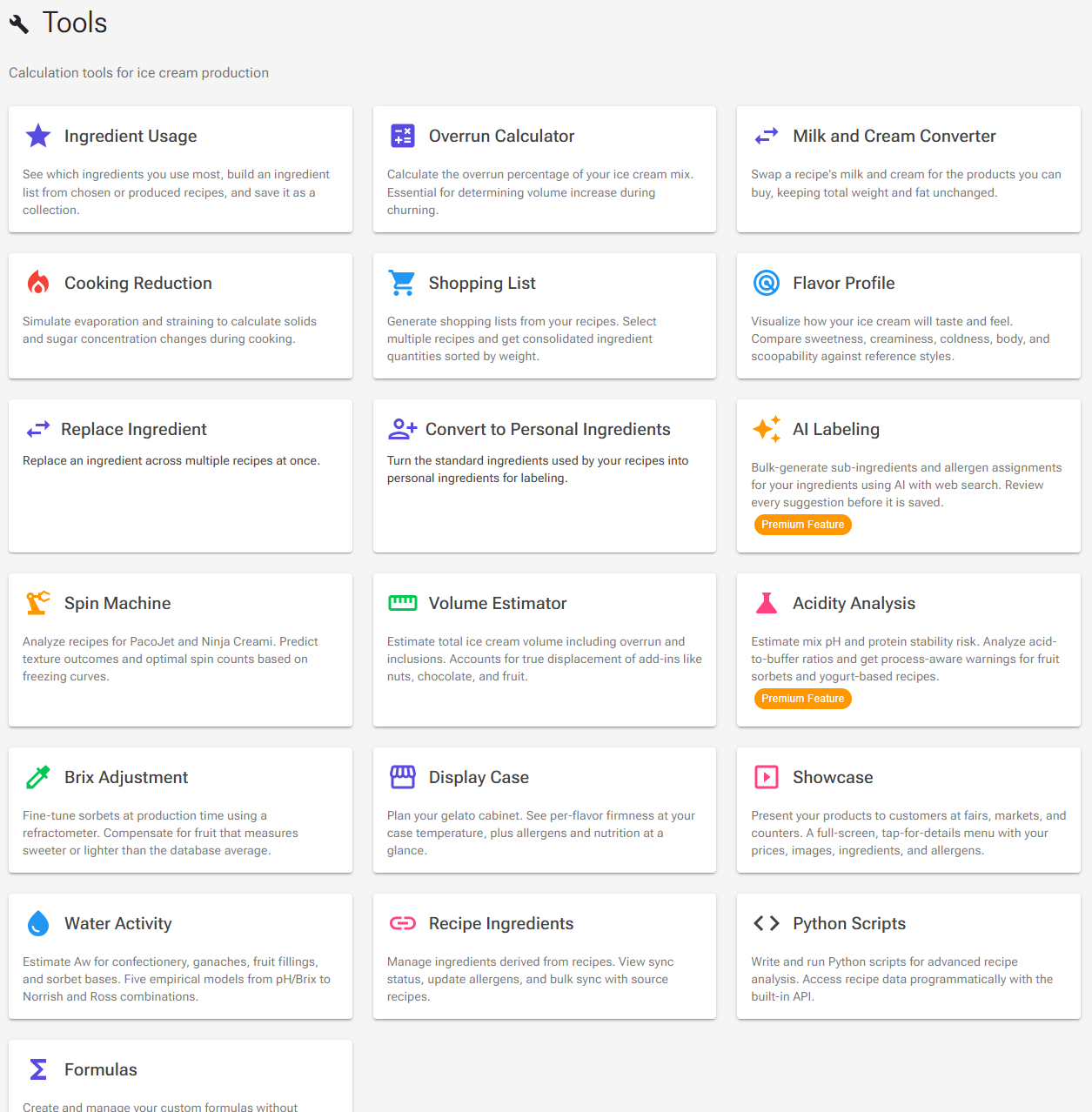
Calculation and Planning Tools
The tools are listed in the order of the cards on the Tools page.
Ingredient Usage
Shows which ingredients you use most and builds an ingredient list from a group of recipes. Under 1. Choose recipes, pick All recipes, Selected recipes or Produced recipes (the production entries of a period you choose, from your production log). For all recipes, Live counts how many of your recipes contain each ingredient now, and Historical counts how often it has ever been added to a recipe; Restart usage counter resets the historical numbers to the live ones.
A bar chart shows the top 10, 20 or 50 ingredients. In the full list below it, tick ingredients (or use Select top or Used in at least) and click Save … as Collection to turn them into an ingredient collection. Free; the production log behind Produced recipes is part of the Premium Production system.
Overrun Calculator
Works out how much air your churned ice cream contains, with two methods side by side. Results update as you type.
- Weight Comparison: weigh the same container filled with mix, then filled with ice cream (tare the empty container first). Ice cream with air in it weighs less for the same volume, and the difference gives the overrun.
- Volume Method: enter the mix volume and the ice cream volume in mL, L, cups or quarts. If you measured the ice cream after adding inclusions, tick My measured volume includes inclusions so their volume is subtracted.
Opened from a recipe (click the Overrun: label next to the overrun field in the Recipe Editor, or Tools › Overrun in the editor), the calculator fills in the recipe's mix volume and predicts the ice cream volume from the recipe's overrun. Change Mix weight to your actual batch, overwrite the ice cream volume with what you measured, and click Set as recipe overrun to copy the result into the recipe. It arrives in the editor as an unsaved change for you to review and save. Free.
Milk and Cream Converter
Recipes from other countries call for milk and cream with fat contents you may not be able to buy. Under 1. The recipe uses, choose the recipe's milk and cream (a product list such as "Whole milk (US)" or "Double cream (UK)" fills in the fat %, or choose Custom) and enter the amounts. Under 2. What I have, choose your own milk and cream. 3. Use this instead shows the new amounts, with the same total weight and the same amount of fat.
If the recipe is richer than your cream or leaner than your milk, no mix can match it exactly; the converter says so and offers Use the closest mix. Copy result copies the amounts, and Show decimals adds a decimal place. The converter needs no recipe and works with any unit, as long as you use the same one throughout. Free; no account needed.
Not the same as the editor's Milk/Cream button. In the Recipe Editor, Tools › Milk/Cream opens Replace Milk and Cream, which works on the open recipe and replaces its milk and cream rows with ingredients from your ingredient database. See Replace Milk and Cream below.
Cooking Reduction
Simulates cooking and straining a syrup, compote or reduction. Add the ingredients, then enter the weight after cooking (and the cooking time, which decides how much alcohol boils off) and the weight after straining. The result table shows how water, sugars, fat, solids and other values change, and Save to My Ingredients stores the result as a new ingredient you can use in recipes. Free; saving the ingredient needs you to be signed in. See Recipe Weights, Scaling & Evaporation.
Shopping List
Adds up the ingredients of several recipes. Click Select Recipes, then set a Multiplier or a Weight for each recipe to match the batch you plan to make. The Consolidated Shopping List shows every ingredient once, with its total weight, heaviest first; Print List prints it.
The Shopping List does not look at your stock: it shows the full amounts, whatever you already have. For a list that subtracts your stock, use Print Shopping List in Production Planning (Premium), which shows Required, Stock and To Buy. Signed in; free.
Flavor Profile
A radar chart of how a recipe will taste and feel (sweetness, creaminess, coldness, body and scoopability), compared with reference styles. Free. See Flavor Profile.
Replace Ingredient
Swaps one ingredient for another across many recipes at once, for example when a supplier changes or you move to your own version of an ingredient.
- Click Select Ingredient to Replace. The Affected Recipes list shows every recipe that uses it, all ticked. It includes recipes where only your unsaved editor version uses the ingredient.
- Untick any recipe you want to leave alone (Select All and Deselect All help).
- Click Select Replacement Ingredient.
- Click Execute Replacement.
The replacement happens at once, without a confirmation, in the saved recipes and in any unsaved editor versions. The weights stay the same and nothing is rebalanced, so if the new ingredient has a different composition, the recipes' values change. There is no undo; to reverse it, run the tool again the other way round and tick only the recipes you changed. Afterwards, open the affected recipes and rebalance them where needed (see Balancing). Free.
Convert to Personal Ingredients
Turns the standard ingredients used by your recipes into your own personal ingredients, so you can add sub-ingredients and allergens for labeling. Signed in. See Convert to Personal Ingredients.
AI Labeling
Uses AI with web search to suggest sub-ingredients and allergens for many of your ingredients at once; you review every suggestion before it is saved. Premium. See AI Labeling.
Spin Machine
Predicts how a recipe behaves in a spin machine such as a PacoJet or a Ninja Creami. Choose a recipe and a machine (built-in profiles for PacoJet and Ninja Creami models and a generic processor, or your own machines via the gear icon, Manage custom machines), set the Storage Temperature, and, if the machine has modes, the First Spin Mode and Re-Spin Mode.
Analyze Spins shows the texture at storage temperature, a Spin Journey with the temperature, frozen water and texture after each spin, a Crumbly Assessment, the recommended number of spins and tips. The page is marked Beta: predictions are based on limited calibration data and may be 1–2 °C off. Free.
Volume Estimator
Estimates the finished volume of a batch, including overrun and the true displacement of inclusions such as nuts, chocolate and fruit. Free. See Volume Estimator.
Acidity Analysis
Estimates a mix's pH and the risk that acid curdles its proteins, which matters for fruit sorbets and yogurt-based or acidic dairy recipes. Pick a recipe; each ingredient gets an estimated pH, titratable acidity (TA) and buffering level, which you can override (an AI button can estimate them for an ingredient).
Under Process Parameters, say whether the Mix will be pasteurized/heated, check the Protein system (dairy, soy, legume, mixed or none), and, for heated mixes, when the acid or fruit is added: from After cooling (safest) to Before heating (riskiest). The result shows a risk level with its Acid-to-Buffer Index, warnings such as a risk of localized curdling, the estimated pH, the acid sources, the buffers and recommendations. The pH is a heuristic estimate, not a measurement. Premium.
Brix Adjustment
Fine-tunes sorbets at production time with a refractometer, when your fruit measures sweeter or less sweet than the database average. Free. See BRIX Adjustment Tool.
Display Case
Plans a gelato cabinet: shows, for each flavor, whether it is too hard, ideal or too soft at your case temperature, with sweetness, allergens and nutrition. Signed in; free. See Display Case.
Showcase
A full-screen customer menu with your prices, images, ingredients and allergens, for a tablet at your counter or on customers' phones through a public link and QR code. Signed in; free, with a Premium customer language. See Showcase.
Water Activity
Estimates water activity (aw) for confectionery, ganaches, fruit fillings and sorbet bases. Each tab uses a different published model, so pick the one that matches what you know about the product:
| Tab | Model | Use it when |
|---|---|---|
| pH + Brix | Gabriel (2008) | You know the pH and °Brix of a fruit-based product or filling. |
| Brix Only | Money-Born (1951) | You have a sucrose-dominated syrup and know its °Brix. |
| Sugar Composition | Norrish (1966) | You know the weight of water and of each sugar or polyol. |
| Sucrose Equivalent | Grover (1947) | You want an estimate for one of your ice cream, gelato or sorbet recipes, from its PAC. |
| Combine Aw Values | Ross (1975) | You have aw values for several components and want the combined value. |
The page is marked Estimation only: results are typically within ±5–10 %, and for food safety, regulatory or commercial decisions you must measure water activity with a calibrated meter. Free.
Recipe Ingredients
Manages the ingredients you have made from your own recipes: their sync status with the source recipe, Sync Now and Sync All, and their allergens. Signed in. See Using a Recipe as an Ingredient.
Python Scripts
Write and run your own Python scripts to analyze recipes. The Python Scripting page has a code editor and a list of your scripts, with buttons to create, save, delete and describe them and to load a sample script. Choose a recipe with the recipe button (without one, the script runs on sample data), open Explore Recipe Data to see what is available to Python as recipe, and click Run. The script runs in your browser, and the output opens in a dialog.
The scripts you save also appear in the Recipe Editor's Tools dialog, under Python Scripts. These recipe scripts are separate from the scripts inside report templates, which are covered in HTML Reports. Premium.
Formulas
Opens your custom formulas without opening a recipe: create, edit and test formulas against a sample recipe or any recipe you choose. Signed in. See Recipe Data Calculation System, section Custom Formulas.
Import Tools
All import tools are described in Import and Export; moving from the Windows desktop app has its own guide.
- Import from Desktop – brings in the database of the Ice Cream Calc desktop app. Quick Migrate works on a free account; in the advanced import, the ingredient step is Premium. See Desktop Migration Guide.
- Import Recipes – recipes from a JSON file exported by the web or desktop app, with automatic ingredient matching. Free; a free account holds up to 15 recipes.
- Import Ingredients – ingredients from a JSON file. Premium.
- Import Charts – charts from a JSON file. Signed in.
Export Tools
All export tools are described in Import and Export.
- Export to Excel – recipes as an Excel workbook, one sheet per recipe. Signed in.
- Export Ingredients – your personal ingredients as a JSON file. Premium.
- Export Recipes – recipes as a JSON file, for sharing or backup. Signed in.
- Export Charts – your charts as a JSON file. Signed in.
- Export to Desktop – a database file for the desktop app. Premium.
- Excel Backup – all your recipes, ingredients and charts as Excel files in one ZIP, for your own records. Premium.
Tools in the Recipe Editor
In the Recipe Editor, the Tools button on the controls bar opens a dialog with the tools that work on the open recipe; the Tools card runs the same tools if you have added it to your editor (see Editor Cards and Layout). Most of them are covered elsewhere: Print, Reports, Produce, Flavor Profile, scaling to Mix volume or Ice Cream Vol., Evaporate, Save as Ingr., Overrun, Export JSON and your Python scripts. Three tools exist only here.
Replace Milk and Cream
Tools › Milk/Cream. Choose the recipe's milk and cream rows (Recipe Milk, Recipe Cream) and the ingredients to use instead (Replace Milk, Replace Cream). The dialog works out new weights that keep the total weight and the fat unchanged and shows them under Replacement Results. Update Recipe puts the new ingredients and weights into the recipe as an unsaved change, which you can undo. The two replacements must have different fat percentages, and the recipe's fat must lie between them.
Stabilizer Ratio
Tools › Stabilizer Ratio sets the proportions between the stabilizers in the recipe, or between the emulsifiers (switch with Stabilizers / Emulsifiers). It lists every mix ingredient that contains stabilizer (or emulsifier), with its weight, the grams of stabilizer it adds, its Content % (how much of the ingredient is stabilizer, which matters for blends) and its share in the Ratio. Change a ratio to shift the balance while keeping the total, or set Total (g), % of mix or % of water to scale them all. Apply writes the new weights to the recipe as one undo step. For doses and blends, see Stabilizers & Emulsifiers.
Final Water %
Tools › Final Water % is meant for confectionery such as caramels, fudge and pralines, where you cook to a target water content. Enter the final water percentage you want; the dialog shows the evaporation, the water to remove and the final weight. Apply sets the recipe's evaporation to match. Ingredients marked Exclude from evaporation (added after cooking) are not counted as cooked. See Recipe Weights, Scaling & Evaporation.