What Sugar Composition Is
Every ingredient in Ice Cream Calculator carries a Total Sugars value. Sugar composition goes one step further: it records which sugars make up that total. Sucrose, glucose, fructose and lactose behave very differently in a frozen mix, so the split decides how hard the ice cream freezes (PAC) and how sweet it tastes (POD).
With a recorded composition, the calculator can:
- Calculate an ingredient's PAC and POD from its sugars instead of relying on a typed-in estimate.
- Show per-sugar totals for every recipe, so you can see how much fructose, glucose or lactose a mix actually contains.
- Let AI propose the split for an ingredient you only know by name.
Premium feature: Editing the sugar composition, the calculated PAC/POD panel and the per-sugar recipe totals are available on the Premium plan. Free users see the Sugars tab with an upgrade prompt, and the ingredient library never offers the sugar columns.
Where to Find It
Open any ingredient in the Edit Ingredient page and click the Sugars chip in the section bar, next to Properties, Composition, Allergens and Tools.
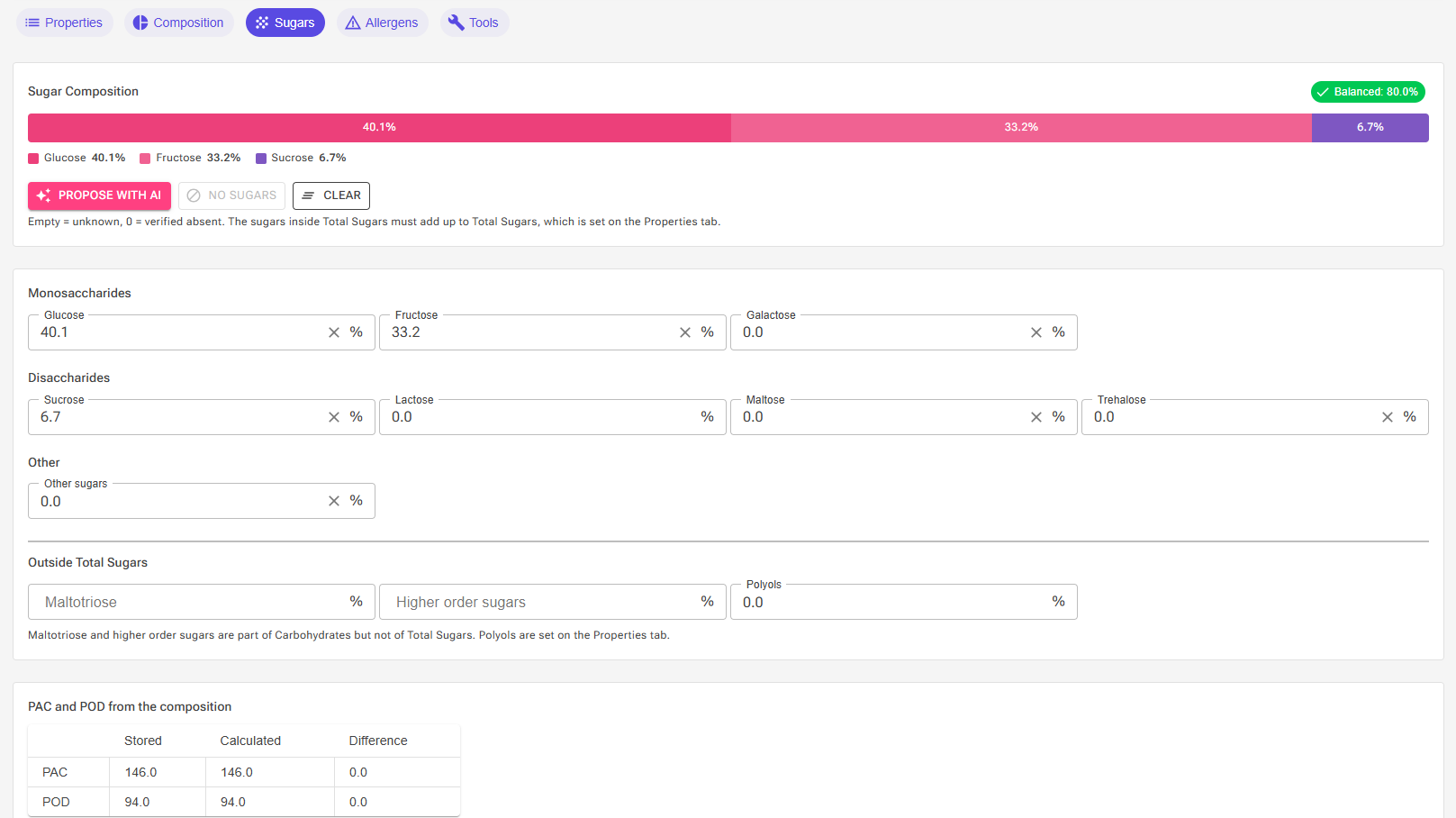
The tab has three panels: the status panel at the top, the sugar fields in the middle, and the PAC and POD comparison at the bottom.
Empty Means Unknown, Zero Means Absent
This is the one rule to understand before you type anything. Each sugar field can be in one of three states:
| Field shows | Meaning | Effect |
|---|---|---|
| Empty | Unknown. Nobody has recorded this sugar. | The composition is incomplete. Recipes treat the ingredient's non-lactose sugar as "unassigned". |
| 0 | Verified absent. The ingredient contains none of this sugar. | Counts as a known value. A composition of all zeros on a zero-sugar ingredient is complete. |
| A value | Grams per 100 g of ingredient, shown as a percentage. | Counts toward the sum against Total Sugars. |
Clearing a field with its clear button puts it back to unknown. Typing 0 records an absence. The difference matters because the calculator never guesses on your behalf: an unknown sugar stays unknown until you, an import, or AI fills it in.
Note: Lactose is the exception. It is a required value on the Properties tab, so it is never unknown and its field on the Sugars tab cannot be cleared.
The Sugar Fields
The fields are grouped by what they are, and by whether they belong inside Total Sugars.
Inside Total Sugars
| Group | Sugars | PAC | POD |
|---|---|---|---|
| Monosaccharides | Glucose | 190 | 77 |
| Fructose | 190 | 170 | |
| Galactose | 190 | 35 | |
| Disaccharides | Sucrose | 100 | 100 |
| Lactose | 100 | 16 | |
| Maltose | 100 | 40 | |
| Trehalose | 100 | 45 | |
| Other | Other sugars | 100 | 100 |
These eight fields must add up to the ingredient's Total Sugars. Other sugars is the catch-all for anything not listed, for example rare sugars in a specialty syrup. It is counted as sucrose in every calculation, so keep it small when you can.
Outside Total Sugars
| Field | What it is | PAC | POD |
|---|---|---|---|
| Maltotriose | The three-unit glucose chain (DP3) found in glucose syrups and maltodextrins. | 67 | 25 |
| Higher order sugars | Longer chains (DP4 and up) from partially hydrolysed starch. | 30 | 10 |
| Polyols | Sugar alcohols. Read-only here; set on the Properties tab. | 150 | 25 |
Maltotriose and higher order sugars are carbohydrates but not sugars in the labelling sense. They do not take part in the sum against Total Sugars, but they do contribute to the calculated PAC and POD. This is how a DE 40 glucose syrup gets its lower freezing point depression than dextrose. See Glucose and Dextrose Explained for the background.
The Status Panel
The top panel compares the sum of the in-Total-Sugars fields against Total Sugars and shows the result as a chip and a stacked bar.
📷 Screenshot: The status panel showing the "Balanced" chip and the stacked bar for a balanced composition, and a second capture with the orange "Sugars vs Total Sugars" chip and the hatched unassigned segment.


| Chip | Meaning | Blocks saving? |
|---|---|---|
| No composition recorded | All seven optional fields are empty. The ingredient is in the same state as before this feature existed. | No |
| Balanced | All fields are known and their sum equals Total Sugars within a tenth of a percent. The composition is complete and valid. | No |
| Sugars vs Total Sugars (orange) | Some fields are still unknown, or the known sugars fall short of Total Sugars. The gap is drawn as a hatched segment on the bar. | No |
| Sugars exceed Total Sugars (red) | The sugars add up to more than Total Sugars. A marker on the bar shows where Total Sugars ends. | No, but fix it |
Nothing on this tab prevents saving. An incomplete or unbalanced composition is simply not used for the recipe per-sugar totals until it is fixed.
Fix Actions
When the composition is short or over, a warning line appears with one-click fixes that only touch the sugar fields:
- Put remainder in Other sugars fills every unknown field with 0 and puts the shortfall to Total Sugars into Other sugars. Use it when you know the main sugars and just need the row to close.
- Scale to Total Sugars multiplies every in-Total-Sugars field, lactose included, by the same factor so the sum lands exactly on Total Sugars. Use it when your source gave a split in slightly different units, or when the sugars are over.
Other Buttons
- Propose with AI asks the AI to split the ingredient's Total Sugars based on its name and stored values. See below.
- No sugars sets every field, lactose included, to 0. It is only enabled when Total Sugars is 0, so it can never create an unbalanced row. Use it to mark a fat, a stabilizer or a flavouring as verified sugar-free.
- Clear puts all optional fields, including maltotriose and higher order sugars, back to unknown. Lactose is kept.
Propose with AI
Click Propose with AI and the AI estimates the split from the ingredient's name and its stored macros. The stored Total Sugars is the anchor: the named sugars come from the AI, and Other sugars is whatever remains, so the result always closes on your Total Sugars rather than on the AI's own figure.
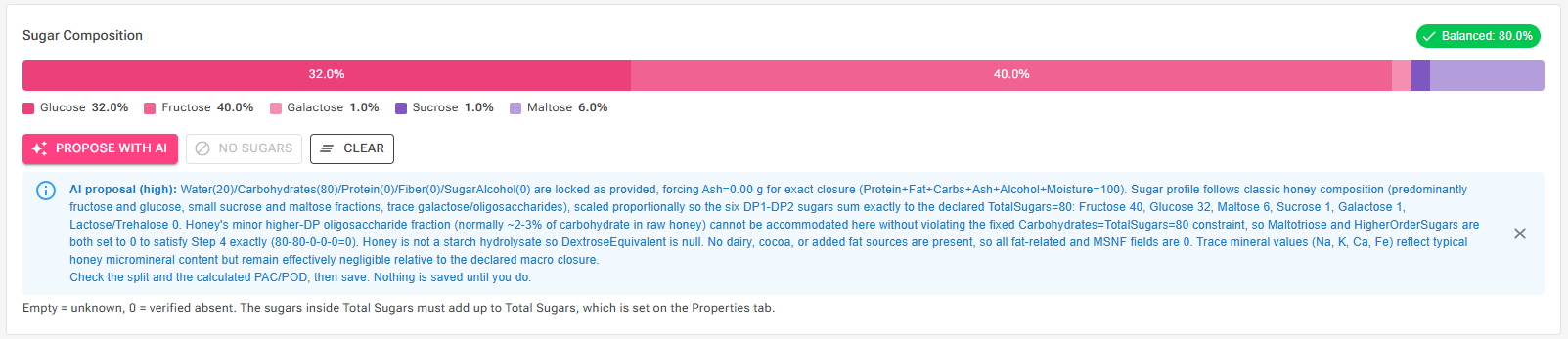
After a proposal:
- Read the rationale in the blue box. It states what the AI assumed about the ingredient.
- Check the split in the fields and the calculated PAC/POD in the bottom panel.
- Save the ingredient. Nothing is stored until you do.
The proposal is rejected, with a message, when it cannot be trusted: when the AI's sugars add up to more than your Total Sugars, when it reported a dextrose equivalent instead of a split (hydrolysates such as glucose syrup need the DE in their name instead), or when its lactose disagrees with the lactose stored on the row.
Tip: Rename a glucose syrup to include its DE, for example "Glucose syrup DE 40", before asking for a proposal. The calculator recognises the DE and uses the syrup model rather than guessing individual sugars.
PAC and POD from the Composition
The bottom panel calculates PAC and POD from the sugars above plus the ingredient's own polyols and alcohol, and shows them next to the stored values with the difference between the two.
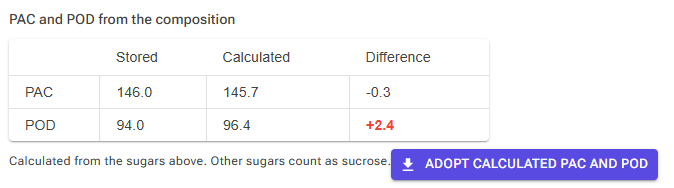
The captions under the table explain any non-sugar contribution: alcohol adds to PAC, and polyols add to both. Polyol constants are averages, so an ingredient whose stored PAC came from a specific polyol's own data may legitimately differ.
Click Adopt calculated PAC and POD to copy the calculated figures onto the Properties tab. The button is only enabled when the composition is balanced. If the ingredient has no sugars at all, the calculated cells stay blank and the button stays disabled, because the stored PAC and POD then come from something other than sugars, such as salt, acids or a rare sweetener, and must not be overwritten.
Note: The calculator button next to PAC on the Properties tab still opens the older PAC/POD calculator dialog. That dialog works on numbers you type into it and does not read or write the composition on this tab. For ingredients with a recorded composition, this panel is the better tool.
Where the Composition Comes From
You rarely have to type the split by hand. Most ways of creating an ingredient now fill it in when the source has the data:
| Method | What gets stored |
|---|---|
| Food databases, BLS tab | The complete split on almost every food. BLS defines total sugars as the sum of the six named sugars, so imported ingredients arrive balanced. |
| Food databases, USDA tabs | The individual sugars USDA reported, with the remainder in Other sugars. When USDA reported only Total Sugars, the composition is left unknown; the food type guess is used for PAC/POD only and never stored as a split. |
| AI Ingredient | The AI's split, anchored on its Total Sugars, when it passes the same checks as Propose with AI. Otherwise unknown. |
| Nutrition Label Import | Nothing. Labels give only Total Sugars, and the app does not store its dairy or general guess as a composition. |
| From recipe (recipe-derived ingredients) | The weighted sum of the recipe's ingredients, when every sugar-bearing ingredient in it has a balanced composition. Otherwise unknown. |
| Ingredient export, import and packs | Carried across unchanged. Older files without the fields import as unknown. |
The library ships with a balanced composition on its standard sugars, syrups and dairy ingredients. Your own older ingredients show "No composition recorded" until you fill them in.
⚠️ VERIFY: The sentence above assumes the admin Sugar Composition audit has been applied to the standard library before this article is published. Adjust or remove it if the To-do count on the admin summary is still large.
Sugars in Recipes
For Premium users, every recipe gains a set of items in the Sugar & Sweetness category of the calculated data: Sucrose, Glucose, Fructose, Maltose, Galactose, Trehalose, Other sugars, Maltotriose and Higher order sugars, each as a percentage of the mix. They can be shown on recipe charts and used in custom formulas like any other property. See Recipe Data Calculation System.
Two more items tell you how much to trust those numbers:
- Unassigned sugars is the non-lactose sugar contributed by ingredients that have no balanced composition. The named sugars plus lactose plus unassigned always equal the recipe's Total sugars, so the named values are lower bounds, and this is what is still unknown.
- Sugar composition coverage is the share of Total sugars that comes from ingredients with a balanced composition, as a percentage. At 100 percent the per-sugar values are complete.
Tip: If coverage is below 100 percent, open the Data Viewer, find which ingredients carry the unassigned sugar, and fill in their composition. Sweeteners and syrups matter most; a pinch of vanilla extract does not.
Maltotriose and higher order sugars are averaged across every ingredient that carries a value, and stay empty only while none does. Evaporating a recipe scales all sugars by the same factor, so a balanced composition stays balanced after concentration.
Sugars in the Ingredient Library
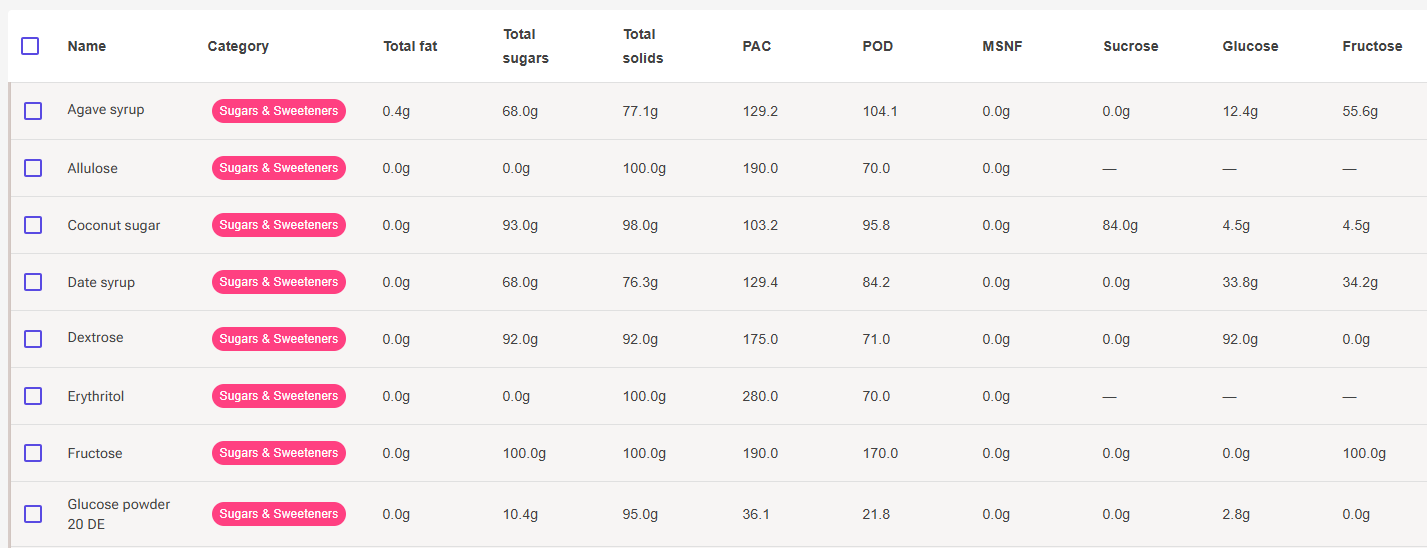
The library table and the column settings offer the nine sugar columns to Premium users. Unknown values show as a dash, never as 0, so you can spot ingredients that still need a composition at a glance. Sorting on a sugar column puts unknown rows first.
Troubleshooting
Problem: The chip says the sugars exceed Total Sugars after I typed values from a data sheet.
Solution: Data sheets often give sugars on a dry-matter basis while Total Sugars is per 100 g of product. Click Scale to Total Sugars to bring the split onto the product basis.
Problem: Adopt calculated PAC and POD is disabled.
Solution: The composition must be balanced first. Use one of the fix actions, or fill in the missing fields. If Total Sugars is 0, the button is intentionally disabled.
Problem: Propose with AI is greyed out.
Solution: It needs a Total Sugars above zero on the Properties tab. For a sugar-free ingredient, use No sugars instead.
Problem: The recipe's per-sugar totals are lower than expected.
Solution: Check Sugar composition coverage. Anything below 100 percent means some ingredient's sugar is sitting in Unassigned sugars. Fill in that ingredient's composition and the totals move.
Related Articles
- Ingredients, section 4, for what PAC and POD mean
- USDA Database
- AI Ingredient
- Glucose and Dextrose Explained
- Recipe Data Calculation System