Your Recipe List
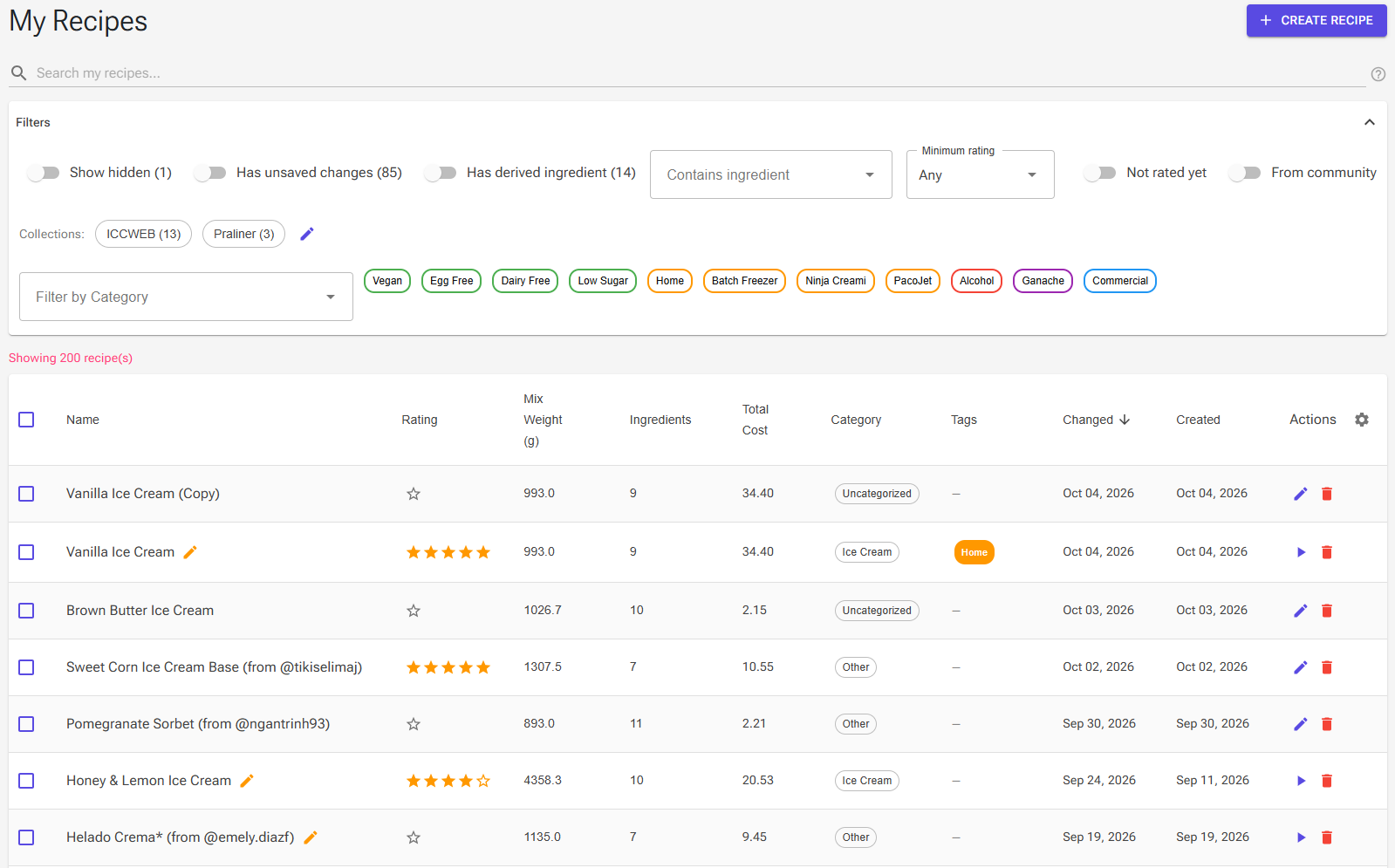
The Recipes page (/recipes, titled My Recipes) is where all your recipes live. Open it from Recipes in the main menu. From here you search and filter your recipes, organize them into collections, change many recipes at once, and start new ones with Create Recipe.
Click a recipe's name to open its Recipe View.
Working as a guest? The button reads Create Recipe (Temporary) and a notice explains that your recipes are saved only temporarily. Create an account to keep them.
Which Page for What
A recipe moves through four pages. Each has its own article:
| Page | How you get there | What you do there |
|---|---|---|
| Recipes (this page) | Main menu › Recipes | Find, filter, organize, and create recipes; change several at once |
| Recipe View | Click a recipe's name | Overview and stats, rating, properties, history, sharing, printing, recipe cards, deleting |
| Recipe Editor | The Edit icon in the list, the Edit Recipe card on Recipe View, or straight after creating a recipe | Ingredients and weights, balancing, charts, calculated data, saving and undo |
| Produce | The Start Production card on Recipe View, or Produce in the editor's Tools | Ingredient checklist, batch scaling, Mark as produced (see Production Logging) |
To have a recipe written for you, use the AI Recipe Generator (see Creating a Recipe below).
Finding Recipes
Search
Type in Search my recipes... above the list. The list filters as you type, and the search looks at recipe names only. Hover the ? icon beside the box for a reminder of the rules:
| You type | Finds recipes whose name |
|---|---|
vanilla |
contains "vanilla" anywhere |
vanilla mint |
contains both words (AND) |
vanilla OR chocolate |
contains either word. Write OR in capitals |
choc* |
starts with "choc" |
*berry |
ends with "berry" |
You can combine them, for example choc* OR van*. Upper and lower case don't matter in the search words.
Filters
Click Filters to open or close the filter panel. Some switches appear only when they apply to you:
- Show hidden – Includes your hidden recipes, marked with a Hidden chip. It appears only when you have hidden recipes, with their number.
- Has unsaved changes – Recipes with edits in the Recipe Editor that haven't been saved yet.
- Has derived ingredient – Recipes you have turned into an ingredient (see Using a Recipe as an Ingredient).
- Contains ingredient – Type to pick one of the ingredients used in your recipes; the list shows only recipes that use it.
- Minimum rating – Any, ★ 2+, ★ 3+, ★ 4+, or ★ 5, based on your personal Overall rating.
- Not rated yet – Recipes you haven't rated. Turning this on clears Minimum rating, and the other way round.
- From community – Recipes you cloned from the community. It appears once you have one.
The rating filters are not shown when you work as a guest. While a search or filter is active, a Clear Filters button appears that resets them.
Collections
Collections are your own folders for recipes. A recipe can be in several collections.
- The Collections: row lists your collections with the number of recipes in each. Click one to show only its recipes; click more to show recipes in any of them. Clear removes the collection filter.
- Click the pencil icon (Manage collections) to rename or delete collections, or Add Collection. Click Done when finished. Deleting a collection never deletes its recipes.
- Put recipes into collections with the Collections bulk action (below) or in the recipe's Properties › Organize.
Category and Tag Filters
On screens 600 px and wider, the bottom of the filter panel has:
- Filter by Category – Show one category, such as Ice Cream, Gelato, Sorbet, or Soft Serve.
- Tag chips – Click tags such as Vegan, Egg Free, Home, Batch Freezer, or Ninja Creami. With several tags selected, the list shows recipes that have any of them. Clear All removes the tag filters.
The Recipe Table
Columns
Narrow screens show fewer columns:
| Column | Shows | Visible from |
|---|---|---|
| Name | Recipe name, the Hidden chip, an edit icon when there are unsaved changes, and up to three collections | All screens |
| Changed / Created | Last change and creation date | 600 px |
| Rating | Your Overall rating; click it to rate (signed-in users only) | 960 px |
| Mix Weight (g) | Weight of the mix | 960 px |
| Actions | Edit (or Continue) and Delete | 960 px |
| Ingredients, Total Cost, Tags | Ingredient count; cost of the ingredients, from the costs set on your ingredients; up to three tags | 1280 px |
| Category | Recipe category | 1920 px |
On phones, each row shows the name, the date of the last change, and a summary line: mix weight, number of ingredients, rating, cost, category, and the first two tags. Tap a recipe to open its Recipe View.
The table shows 30 recipes per page; change this with Rows per page (10, 30, 50, or 100) at the bottom.
Sorting and Default Sort
Click a column header to sort by it, and click again to reverse the order. The list starts sorted by Changed, newest first.
To change the starting order, click the gear icon in the Actions header and pick a Default Sort: Changed (newest or oldest first), Name (A-Z or Z-A), Mix Weight (high to low or low to high), Category (A-Z or Z-A), or Rating (best first). Your choice is saved for your account.
Row Actions
- Click the name (or another cell) – Opens the recipe's Recipe View.
- Edit (pencil) – Opens the recipe in the Recipe Editor. When the recipe has unsaved changes, the icon is a play button, Continue, which takes you back to your edits.
- Delete (bin) – Works like the Delete icon on Recipe View: a recipe in use by production logs, plans, recipe sets, sales orders, or products can only be archived (hidden). See Recipe View.
- Rating cell – Click the stars to rate the recipe. See Recipe Ratings.
Bulk Actions
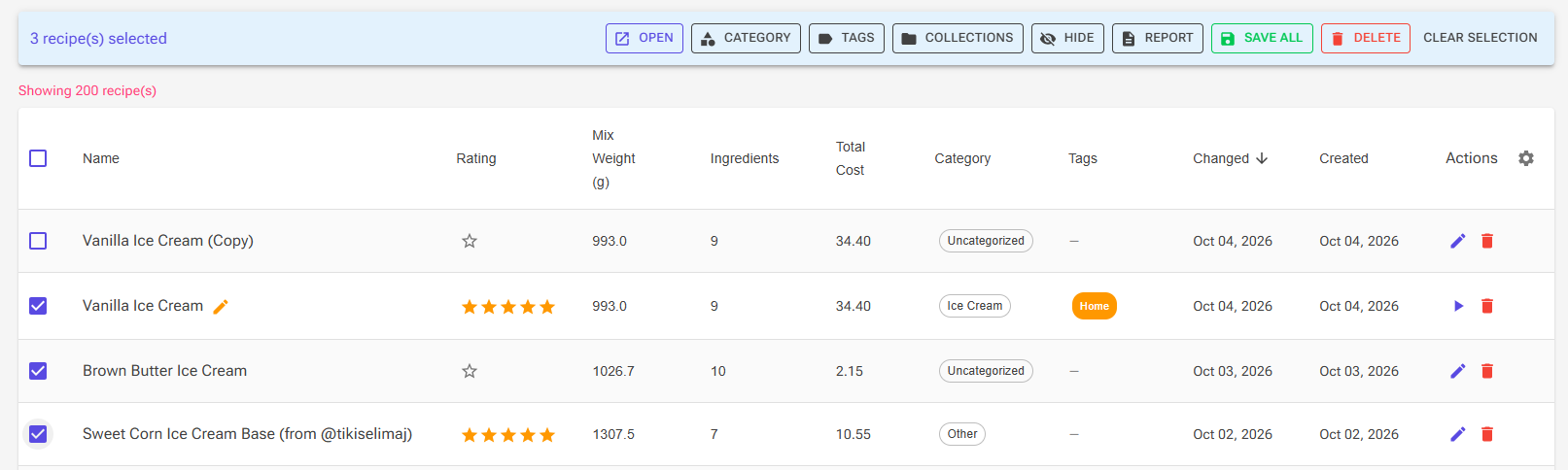
Tick the checkboxes in front of the recipes you want to change. The checkbox in the header selects every recipe that matches the current search and filters, on all pages. A blue bar then shows how many recipes are selected and these actions:
| Action | What it does |
|---|---|
| Open | Adds the recipes to the recipe tab bar at the top of the app, so you can switch between them. The tab bar can be turned off in Settings. |
| Category | Sets one category for all selected recipes. |
| Tags | Adds or removes tags. A ticked tag is added to all recipes, an empty box removes it from all, and a mixed box leaves each recipe as it is. |
| Collections | Adds recipes to collections or removes them, with the same three box states as Tags. |
| Hide | Hides the selected recipes, or shows them again (unhide). |
| Report | Opens the report dialog. One recipe uses the recipe report templates; several use the Recipe Set templates. See HTML Reports. |
| Save All | Appears when a selected recipe has unsaved changes. Saves those changes without opening each recipe. |
| Delete | Deletes the selected recipes after a confirmation. The confirmation warns if any of them have production history or are used in Recipe Sets or Sales Orders; those references are deleted with them. |
| Clear Selection | Unticks everything. |
Tip: To keep a recipe's production history but get it out of the way, use Hide instead of Delete.
Locked Recipes on the Free Plan
The Free plan includes 15 recipes. If you have more – for example after an import, or after Premium ends – only your 15 newest recipes (by creation date) stay available. The older ones are locked:
- A notice above the table says some recipes are locked, with an Upgrade button.
- Locked rows are dimmed and show a lock icon and a Premium chip. You can't open or select them, and their Actions column shows Upgrade.
- Nothing is deleted. Upgrading to Premium unlocks them all.
When you already have 15 recipes on the Free plan, creating another one opens an upgrade dialog instead. See Account, Premium and Your Data.
Creating a Recipe
Click Create Recipe at the top of the Recipes page (the Home page links to the same place). The Create New Recipe page offers four ways to start. Each one asks for the recipe's name first, then opens the new recipe in the Recipe Editor.
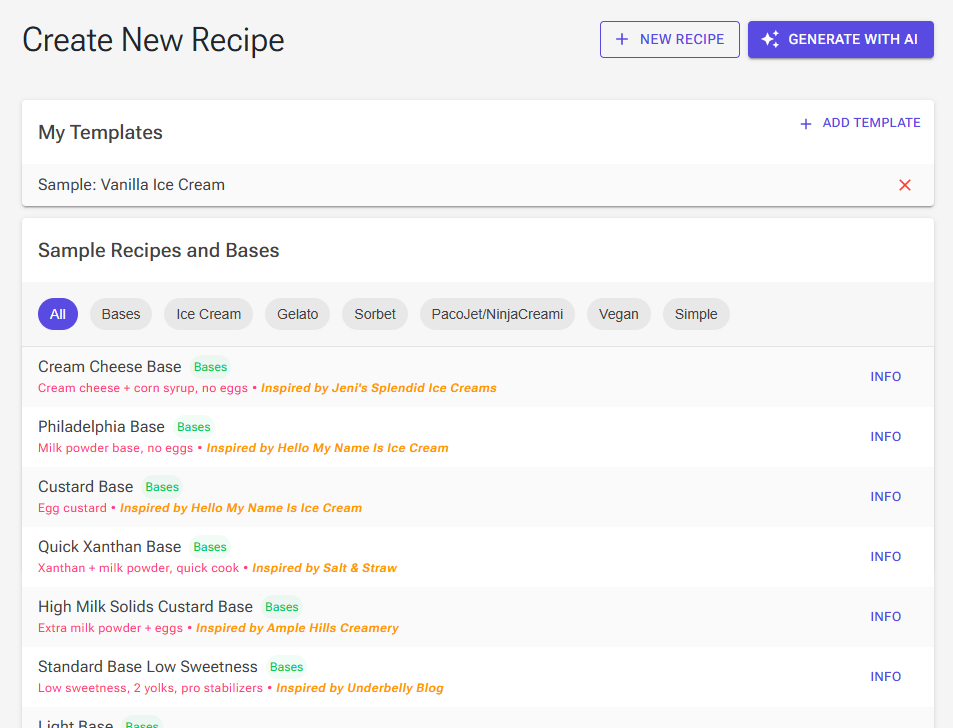
New Recipe (Blank)
Click New Recipe to start with an empty recipe and add the ingredients yourself.
Generate with AI
Click Generate with AI to describe the ice cream you want and let the AI build the recipe. This is a Premium feature; on the Free plan you see an upgrade dialog. See AI Recipe Generator.
My Templates
Templates are your own recipes that you often use as a starting point, such as a house base.
- Click Add Template and pick one of your recipes (signed-in users).
- Click a template to create a copy of it; the suggested name is "My" plus the template's name. The copy gets the template's ingredients, description and notes, evaporation, overrun and instructions, and its own copies of the product and detail images, so changing an image on one recipe does not affect the other.
- The × button removes a recipe from your templates. The recipe itself stays.
- Until you add a template of your own, the list offers Sample: Vanilla Ice Cream.
Sample Recipes and Bases
A library of ready-made recipes and bases to learn from or build on.
- Filter the list with the chips: All, Bases, Ice Cream, Gelato, Sorbet, PacoJet/NinjaCreami, Vegan, and Simple.
- Each entry has a short description, and some credit the recipe they are inspired by.
- Click an entry or its Info button to see its ingredients and key values (fat, sugar, solids, protein). Click Create Recipe to make your own copy. Where the sample has a recommended chart, the new recipe uses it.
Tips
- Find a recipe fast: combine a search with a filter, for example
gelato*with Minimum rating ★ 4+. - Tidy up without losing history: hide old recipes instead of deleting them; Show hidden brings them back into view.
- Organize by purpose: use collections for things like a season, a customer, or a menu, and tags for properties such as Vegan or Batch Freezer.
- Finish what you started: turn on Has unsaved changes to see recipes with edits you haven't saved, then save them with Save All or continue in the editor.
- Reuse your best base: add it to My Templates so every new recipe can start from it.
Related Articles
- Recipe View – The recipe's dashboard
- Recipe Editor – Editing, balancing, saving, and undo
- AI Recipe Generator – Let the AI write a recipe
- Recipe Ratings – Rate your recipes and filter by rating
- Recipe Cards – Printable and shareable cards