Why Use a Recipe as an Ingredient
Many shops make some of their ingredients themselves: a vanilla or chocolate base, a caramel sauce, a fruit variegate, a praline paste. You can build each of these as an ordinary recipe and then turn it into a recipe-derived ingredient, an ingredient whose values are calculated from its source recipe.
Used in another recipe, it behaves like any ingredient, but:
- you never type its composition: it comes from the recipe, after evaporation;
- it stays linked to the recipe, so changes to the recipe can flow through to every recipe that uses it;
- its sub-ingredients and allergens are inherited from the recipe's ingredients, for your ingredient list and allergen statement;
- in production, producing the source recipe adds stock of the ingredient, and recipes that use it can draw on that stock.
Creating a Recipe-Derived Ingredient
There are three ways to create one. The first two give the new ingredient the category Other and the description "Derived from recipe: recipe name". You can change both later.
Save the Recipe as an Ingredient
- Open the base recipe in the Recipe Editor.
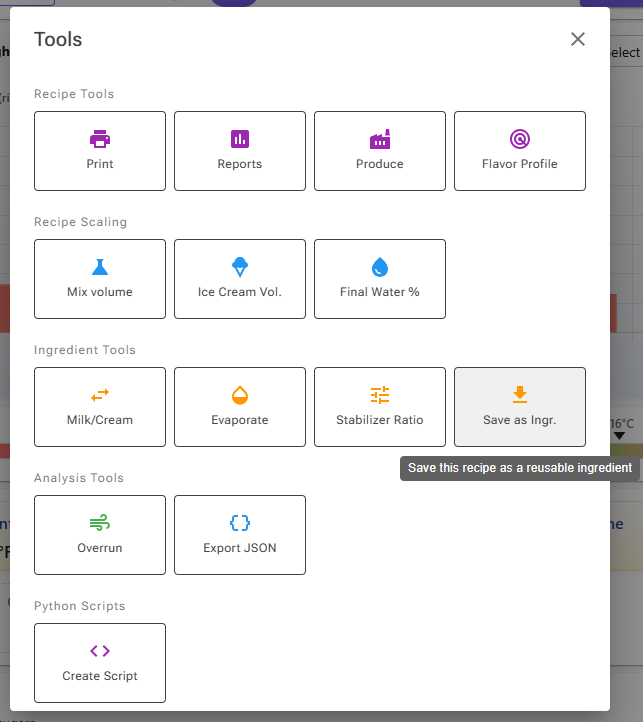
- Click Tools and, under Ingredient Tools, click Save as Ingr. The same button is on the Tools card, if you have added it to your editor layout.
- Enter a name for the ingredient. The recipe's name is suggested.
- Click Create.
The ingredient is calculated from the recipe as it is in the editor at that moment. Once a recipe has a derived ingredient, the same Tools button reads Edit Ingredient and opens it in the ingredient editor.
Add a Recipe Directly to Another Recipe
In the recipe that will use the base, click Recipe ("Add a Recipe as an ingredient") in the action bar under the ingredient grid, next to the Ingredient button. Pick the base recipe and click Add. If the base already has a derived ingredient, that one is added; otherwise a new one is created with the recipe's name. It is added with a weight of 100 g, which you then adjust.
From Recipe in the Ingredient Editor
When you edit one of your own ingredients, the import card has a From Recipe button ("Convert recipe to ingredient"). Pick a saved recipe and the ingredient's values are replaced by the recipe's, and the ingredient becomes linked to it. Check the name, category and description, then save the ingredient to keep the change.
One Level Deep
Recipe-derived ingredients go one level deep. A recipe that contains a recipe-derived ingredient cannot itself be turned into one, and a recipe that is used as an ingredient cannot have a recipe-derived ingredient added to it. The app explains this in a message when you try.
What the Ingredient Contains
The values describe the finished source recipe, per 100 g:
- After evaporation. If the recipe is cooked down, fat, sugars, solids, PAC, POD and the other values are concentrated to match the finished weight.
- Inclusions are counted; infusions are not. Infusions are steeped and removed, so they add no nutrition. Their allergens are still carried over, and their cost is included.
- Sugar composition. The per-sugar values are summed from the ingredients that have a balanced sugar composition. See Sugar Composition.
- Cost per kg. The cost of all the recipe's ingredients divided by the finished weight, so evaporation raises the cost per kg. It is kept on the ingredient's stock record: it is filled in when you start tracking the ingredient in stock or produce its source recipe, and recalculated when the recipe is synced or an ingredient's cost changes. You cannot type it yourself.
In the Recipe Editor, a recipe-derived ingredient shows a link icon on the selected-ingredient chip. Click the chip to open the source recipe, either at Original Weight or Scaled to the amount this recipe needs (you can also multiply by moulds and cavities).
Keeping It in Sync
The link to the source recipe is what keeps the ingredient current. These changes update it automatically:
- Saving the source recipe in the Recipe Editor. When you click Save, its derived ingredient is recalculated straight away, and a message says that the ingredient was synced.
- Saving an ingredient that the source recipe uses. When you save a base ingredient in the ingredient editor, every derived ingredient whose recipe uses it is recalculated, and a message says how many were updated. Editing that ingredient's sub-ingredients or allergens does the same.
- Changing an ingredient's cost. The cost of the derived ingredient is recalculated, if it is tracked in stock.
A sync keeps the derived ingredient's name, category and description, and replaces everything else with the values calculated from the recipe.
If the source recipe is changed after the last sync without being saved in the Recipe Editor, for example on the Recipes page or through the REST API, the derived ingredient is not updated by itself. It is then marked Sync Available on the Recipe Ingredients page, where you can sync it (see below).
Editing a Recipe-Derived Ingredient
Open the ingredient in the ingredient editor to change its category or description. The name field is locked, the cost field is disabled, and the import buttons are hidden; the card Derived from recipe shows the source recipe with an Edit Recipe button. When you save, the editor asks you to confirm Save Metadata: only the description and category are saved, because the values come from the recipe. To change the values themselves, edit the recipe, or unlink the ingredient.
Sub-Ingredients and Allergens
A recipe-derived ingredient inherits its sub-ingredients and allergens from the source recipe:
- Sub-ingredients are merged from the recipe's ingredients, weighted by their share of the recipe. An ingredient without sub-ingredients of its own counts under its own name.
- Allergens are combined from all the recipe's ingredients, infusions included.
In the Sub-Ingredients & Allergens dialog (the Sub-Ingredients & Labeling tile on the ingredient's Tools tab) they are read-only, with a note that they come from the source recipe and an Open recipe link. To change them, change the recipe's ingredients. This is how a base made in-house shows its own components in the ingredient list of every recipe that uses it. See Professional Ingredient Lists.
The Recipe Ingredients Page
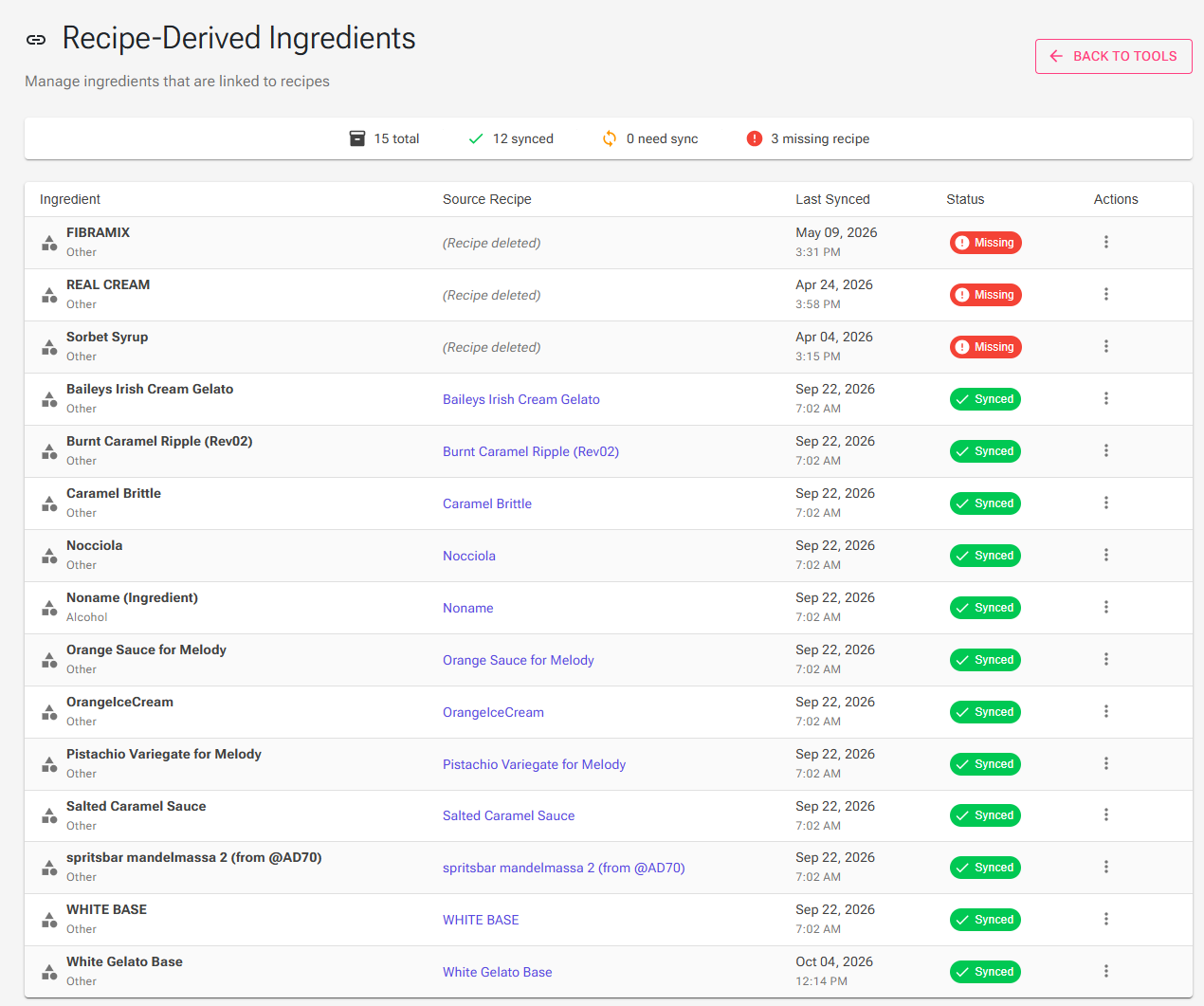
All your recipe-derived ingredients are listed on one page. Open Tools and click the Recipe Ingredients card (the page itself is titled Recipe-Derived Ingredients). You need to be signed in.
The summary line counts the ingredients that are synced, that need a sync, that have allergen changes, and whose recipe is missing. The table shows each ingredient with its category, the source recipe (click it to open the recipe), the date of the last sync and its status:
| Status | Meaning |
|---|---|
| Synced | The ingredient was updated after the source recipe's last change. |
| Sync Available | The source recipe has changed since the last sync, or the ingredient has never been synced. |
| Missing | The source recipe cannot be found. |
| Allergens (extra chip) | The allergens of the recipe's ingredients differ from the ingredient's. A sync brings them in line. |
The menu on each row offers:
- Sync Now recalculates the ingredient from its recipe now.
- View Recipe opens the source recipe.
- Edit Ingredient opens the ingredient editor.
- Unlink from Recipe turns it into a regular ingredient (see below).
Sync All at the top syncs every ingredient that needs it, after a confirmation. Names, categories and descriptions are kept.
On the Ingredients page, the Recipe-Derived source filter shows only these ingredients. On the Recipes page, Has derived ingredient filters the recipe list to the recipes that are the source of one.
In Production
Recipe-derived ingredients connect your production of bases to the recipes that use them.
Producing the Source Recipe
When you mark a source recipe as produced, the production dialog shows a green Produced row with a factory icon for its derived ingredient, with the stock before and after. After you confirm, the batch's yield after evaporation is added to the ingredient's stock as an in-house lot, with a cost per kg from the batch cost and, if the recipe has Best Before days, an expiry date.
Producing a Recipe That Uses It
By default, a recipe that contains a recipe-derived ingredient deducts that ingredient from its own stock, the base you produced earlier.
If you did not log the base as produced, tick Deduct base ingredients of recipe-derived ingredients in the production dialog. The base recipe's ingredients are then listed, marked "via" the base, and deducted instead, scaled to the amount of base the batch needs. Your choice is remembered for the next production. See Stock Management.
Planning
When you add a production plan for a recipe that uses a recipe-derived ingredient, a Recipe-Derived Ingredient Detected dialog shows how much of it the plan needs, how much is committed to other plans, the current stock and the net balance. It offers to add a production plan for the source recipe, update an existing one, or skip. The planning ingredient forecast also has Expand to raw ingredients and Recipe-derived only switches. See Production Planning.
Unlinking
Unlink an ingredient when you want to keep its current values and edit them by hand, or when the base no longer follows the recipe:
- On the Recipe Ingredients page, choose Unlink from Recipe in the row's menu, or
- in the ingredient editor, click Unlink on the Derived from recipe card, then save the ingredient.
The ingredient becomes a regular personal ingredient with the values it had. It is no longer synced, its sub-ingredients and allergens become editable, and producing the former source recipe no longer adds to its stock.
If you delete a source recipe, its derived ingredient is unlinked automatically and keeps its last values.
Troubleshooting
Problem: "Cannot Create Ingredient" or "Cannot Add Recipe" when I try to use a recipe as an ingredient.
Solution: One of the two recipes already involves a recipe-derived ingredient. They go one level deep: replace the nested derived ingredient with its base ingredients, or unlink it.
Problem: I changed the base recipe, but the recipes that use it still show the old values.
Solution: Save the base recipe in the Recipe Editor, or open the Recipe Ingredients page and click Sync Now on its row.
Problem: I cannot change the derived ingredient's values in the ingredient editor.
Solution: Only the category and description are saved for a linked ingredient. Change the recipe instead, or unlink the ingredient first.