1. Key Concepts
This guide explains how the Production System handles weight, volume, overrun, evaporation and inclusions — and how the numbers connect from planning, through production, to packing.
Before diving into the production system, it helps to understand the key terms and how they relate to each other. These concepts are used throughout the calculator and production planning.
Note: Production Planning, Mark as produced, Stock and packing are Premium features.
1.1 Mix Weight
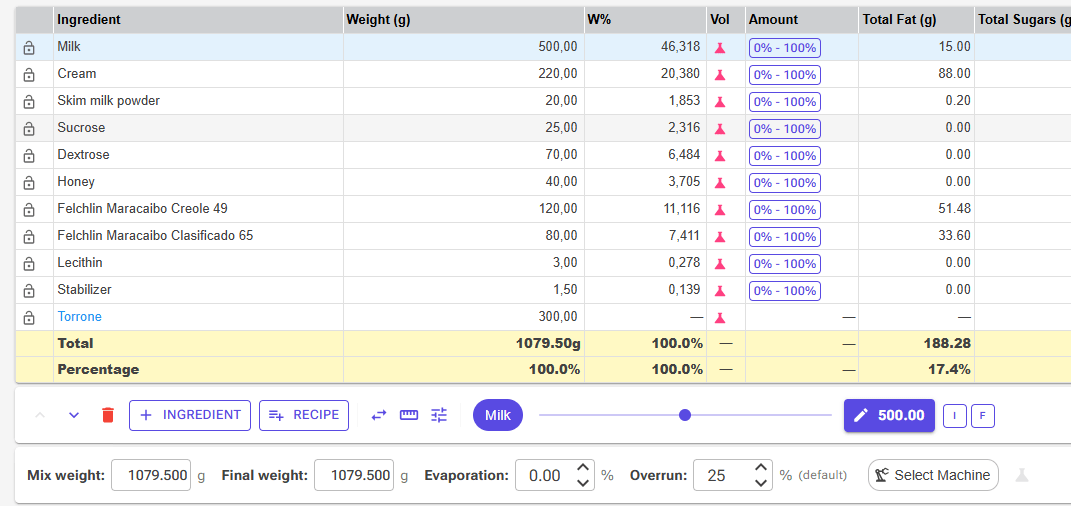
Mix Weight is the total weight of all base ingredients that go into your pot or pasteurizer. This includes milk, cream, sugar, stabilizers, emulsifiers, and all other ingredients that make up the liquid ice cream base.
Mix Weight does not include inclusions (add-ins like chocolate chips, cookie dough, fruit pieces) or infusions (ingredients steeped and removed, like vanilla pods or tea leaves).
1.2 Inclusions (Add-ins)
Inclusions are solid ingredients that are folded into the ice cream after churning. They are physically present in the final product and take up space in the container, but they are not part of the liquid mix that gets pasteurized and churned.
Common examples:
- Chocolate chips, chunks, or shavings
- Cookie dough pieces
- Nut pieces, praline
- Fruit pieces, candied fruit
- Swirl sauces (caramel, fudge)
In the Recipe Editor, select the ingredient and click the I button (Flag this ingredient as an Inclusion) to mark it as an inclusion. This distinction is critical because inclusions affect volume and weight calculations differently from mix ingredients.
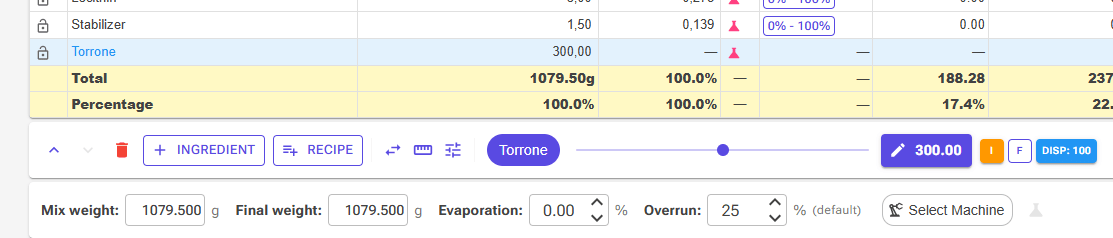
How much space an inclusion takes up comes from its Displacement: the volume in millilitres that 100 g of it occupies inside the ice cream. Bulky, airy pieces (such as malted milk balls, around 210 mL per 100 g) take more room than dense ones (such as fudge, around 75 mL per 100 g).
- Set an ingredient's Displacement (mL/100g) in its properties in the ingredient editor.
- To use a different value in one recipe only, select the inclusion in the Recipe Editor and click its Disp button.
- Without a value, the app estimates the displacement from the ingredient's composition (100 ÷ density).
Inclusion Volume (mL) = Inclusion Weight (g) × Displacement ÷ 100. The Volume Estimator article explains how to measure displacement.
1.3 Overrun
Overrun is the percentage of air incorporated into the ice cream during churning. It is defined as:
Overrun % = ((Volume of ice cream − Volume of mix) / Volume of mix) × 100
For example, if you start with 10 liters of liquid mix and churn it into 12.5 liters of ice cream, the overrun is 25%.
| Ice Cream Style | Typical Overrun |
|---|---|
| Gelato | 20–40% |
| Premium ice cream | 25–50% |
| Standard ice cream | 60–100% |
| Economy / soft serve | 80–120% |
💡 Per-Recipe Overrun: Each recipe can store its own overrun, because different recipes typically have different overrun — a dense gelato and a light soft serve behave very differently. Set it in the Overrun field of the Recipe Editor's weight bar. A recipe without its own value uses the Default Overrun (%) from Settings → Display Settings; the field then shows (default), and Reset returns a recipe to the default. Production planning uses the recipe's overrun, or the default when it has none.
1.4 Density
Mix density is how heavy the liquid mix is per unit of volume, measured in grams per milliliter (g/mL). A typical ice cream mix has a density of around 1.05–1.12 g/mL, meaning it is slightly heavier than water (1.0 g/mL).
The calculator computes the density automatically from the composition of the mix after evaporation:
Density = 1 ÷ (Fat ÷ 0.9 + Non-fat solids ÷ 1.58 + Water)
Each component is a fraction of the mix weight. Fat (about 0.9 g/mL) is lighter than water, so more fat lowers the density. Sugars, milk solids and other non-fat solids (about 1.58 g/mL) are heavier than water, so more of them raises it. A high-fat mix therefore weighs less per litre than a high-sugar one.
1.5 Evaporation
Evaporation is the water lost when you cook the mix, as a percentage of the weight of the ingredients that are cooked. Cooking in an open pot on a stove typically loses 3–5%. A closed pasteurizer loses little or no water, so 0% is usual there. Evaporation is set per recipe in the Recipe Editor's weight bar.
Only cooked ingredients lose water. An ingredient you add after cooking, marked with the E button (Exclude from evaporation), keeps its full weight. When evaporation is non-zero, the Final Weight (after cooking) is less than the Mix Weight (what you weigh out):
Final Weight = Mix Weight − (Cooked Weight × Evaporation %)
When every ingredient is cooked, this is simply Mix Weight × (1 − Evaporation %). For the mix as a whole, the app works with the effective evaporation (Cooked Weight × Evaporation % ÷ Mix Weight). Planning, production and packing all use this figure.
Example: a 1000 g mix with 4% evaporation, of which 100 g is a sauce stirred in after cooking. Final Weight = 1000 g − (900 g × 4%) = 964 g, and the effective evaporation is 3.6%.
For the evaporation tools in the Recipe Editor (Exclude from evaporation, Evaporate Ingredient, the Cooking Reduction calculator), see Recipe Weights, Scaling & Evaporation.
1.6 Waste Factor
Each ingredient row in a recipe has a waste factor (its Scale factor: 1.0 = no waste, 1.1 = 10% extra). It covers what is lost before the ingredient reaches the mix, such as peel, stones or what is left in a tin. It does not change the recipe's composition or mix weight, but planning and production use it: the ingredient forecast and stock deduction both use recipe weight × waste factor.
Set it per row in the Scale column of the Recipe Editor's ingredient grid; the Scale Factor dialog also has a Yield / Waste calculator. New rows take the factor from the ingredient's Default Scale.
2. How the Numbers Fit Together
The journey from raw ingredients to a filled container involves several transformations. Each step changes either the weight or volume of the product.
2.1 The Production Flow
⚖️ Weigh ingredients → 🍳 Cook / pasteurize → 🌀 Churn (add air) → 🍫 Fold in inclusions → 📦 Fill containers
| Step | What Happens | How Quantity Changes | Example (1000g recipe, 25% overrun) |
|---|---|---|---|
| 1 | Weigh ingredients | Mix Weight (what you weigh out) | 1000g mix + 100g chocolate chips |
| 2 | Cook / pasteurize | Final Weight = Mix Weight − Cooked Weight × evap% | 1000g − 3% = 970g (all ingredients cooked) |
| 3 | Churn (add air) | Mix vol = Final Weight ÷ density; ice cream vol = mix vol × (1 + overrun%) | 970g ÷ 1.08 g/mL = 0.90L mix → 0.90 × 1.25 = 1.12L ice cream |
| 4 | Fold in inclusions | Final vol = ice cream vol + inclusion vol | 1.12L + 0.08L chips (80 mL per 100g) = 1.20L product |
| 5 | Fill containers | Container count = final vol / container size | 1.20L / 0.5L = 2.4 cups |
⚠️ Important: Weight vs Volume The Production Planning system works in mix weight (kg). This is the weight you actually measure out on your scale. When you plan production using containers or volume-based products (like “500mL cups”), the system converts the target volume back to the mix weight you need to prepare. Understanding this conversion is essential.
2.2 The Volume-to-Weight Conversion
When you plan with containers or with a volume-based product (e.g., 500mL cups), the system needs to work backwards from the final product volume to the mix weight you need to prepare. Here is how it works:
| Step | Calculation | Example: 40 × 500mL cups |
|---|---|---|
| 1 | Total product volume = units × volume per unit | 40 × 500mL = 20,000mL = 20.0L |
| 2 | Subtract the inclusions' share of the volume (taken from the recipe: inclusion volume ÷ product volume) | Inclusions are 8% of this recipe's volume: 20.0L − 1.6L = 18.4L churned base |
| 3 | Reverse overrun: mix vol = base vol / (1 + overrun%) | 18.4L / 1.25 = 14.7L liquid mix |
| 4 | Apply density: final weight = mix vol × density | 14.7L × 1.08 kg/L = 15.9 kg |
| 5 | Reverse evaporation: mix weight = final wt / (1 − effective evap%) | 15.9 / 0.97 = 16.4 kg mix weight |
The result (16.4 kg in this example) is the Mix Weight — the number stored in your production plan. This is what you weigh on your scale. Packing uses the same calculation without step 5, because by then the water has already evaporated (see section 6).
3. Production Planning
On the planning calendar, each day has a Recipe button and a Product button. Recipe adds a plan for one recipe; the plan dialog offers three ways to set the batch size (3.1–3.3). Product plans a number of units of a product (3.5). For the calendar itself, see Production Planning.
3.1 Planning by Weight (Direct)
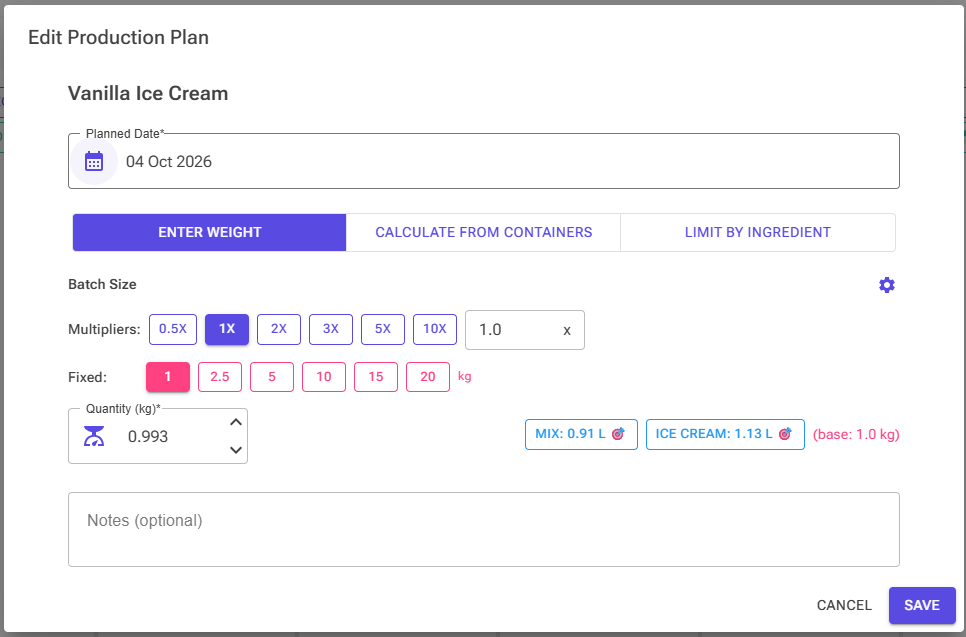
The simplest way to plan production is to specify the mix weight directly. In the plan dialog, choose Enter Weight and type the weight in kilograms, or use the multiplier buttons (0.5x, 1x, 2x …) and the fixed-weight buttons. A new plan starts at the recipe's own mix weight (1x).
For example, if your recipe is 1000g and you want to make a double batch, set the planned quantity to 2.0 kg. The system will scale all ingredient quantities proportionally.
The Mix 🎯 and Ice Cream 🎯 buttons show the batch's volumes and let you size the batch to a target mix volume or ice cream volume instead.
3.2 Planning by Containers
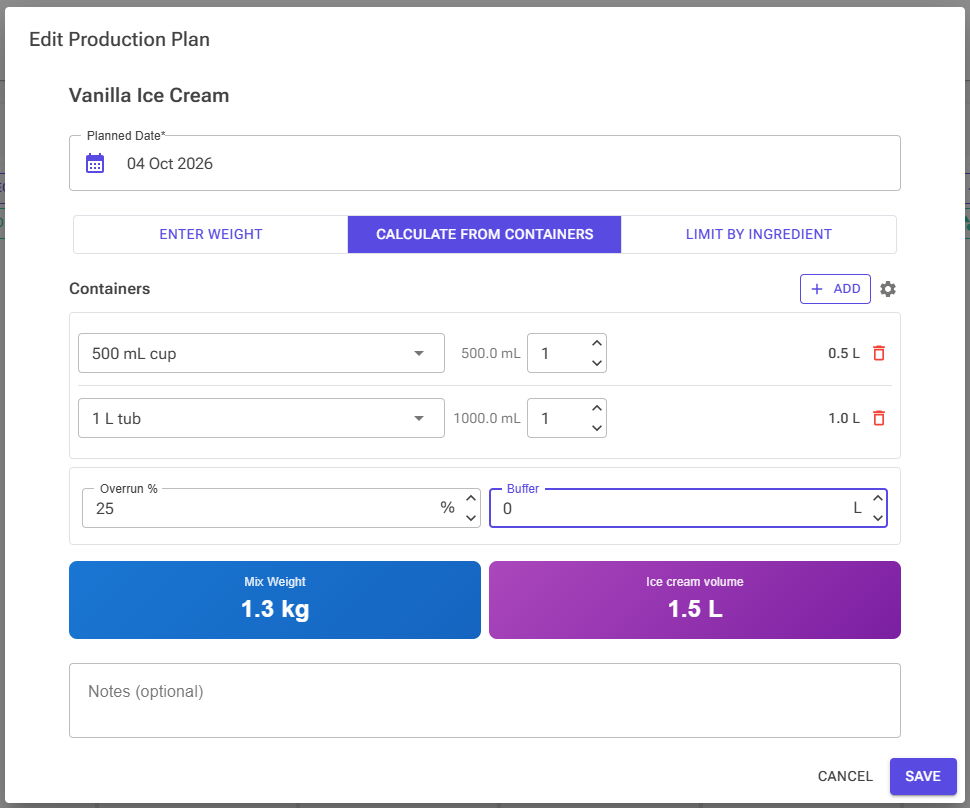
When you plan using containers (e.g., “fill 20 tubs of 2.5L”), choose Calculate from Containers, click Add for each container type and enter the quantity. The settings icon opens Manage Containers, where you set up your own container sizes.
Two adjustments sit below the list:
- Overrun %: pre-filled with the recipe's overrun (or the Settings default) and editable for this plan.
- Buffer: extra volume on top of the containers, in litres (quarts with imperial units), as a safety margin.
The dialog shows the resulting Mix Weight and Ice cream volume. It uses the conversion described in Section 2.2, which accounts for inclusions, overrun, density and evaporation. The overrun and buffer you use are saved with the plan.
3.3 Limit by Ingredient
Choose Limit by Ingredient to size the batch from what you have. The table lists every ingredient in the recipe with its Recipe %, the amount In Stock (N/A when you don't track the ingredient) and a Limit Amount, pre-filled with the stock. Max Recipe Weight shows the largest batch that amount allows:
Max Recipe Weight = Limit Amount ÷ Recipe %
The ingredient that allows the smallest batch (the bottleneck) is highlighted and picked automatically. Type your own Limit Amount, for example the 600 g of pistachio paste you want to use up, or pick another row. The RECIPE WEIGHT shown below the table becomes the planned quantity.
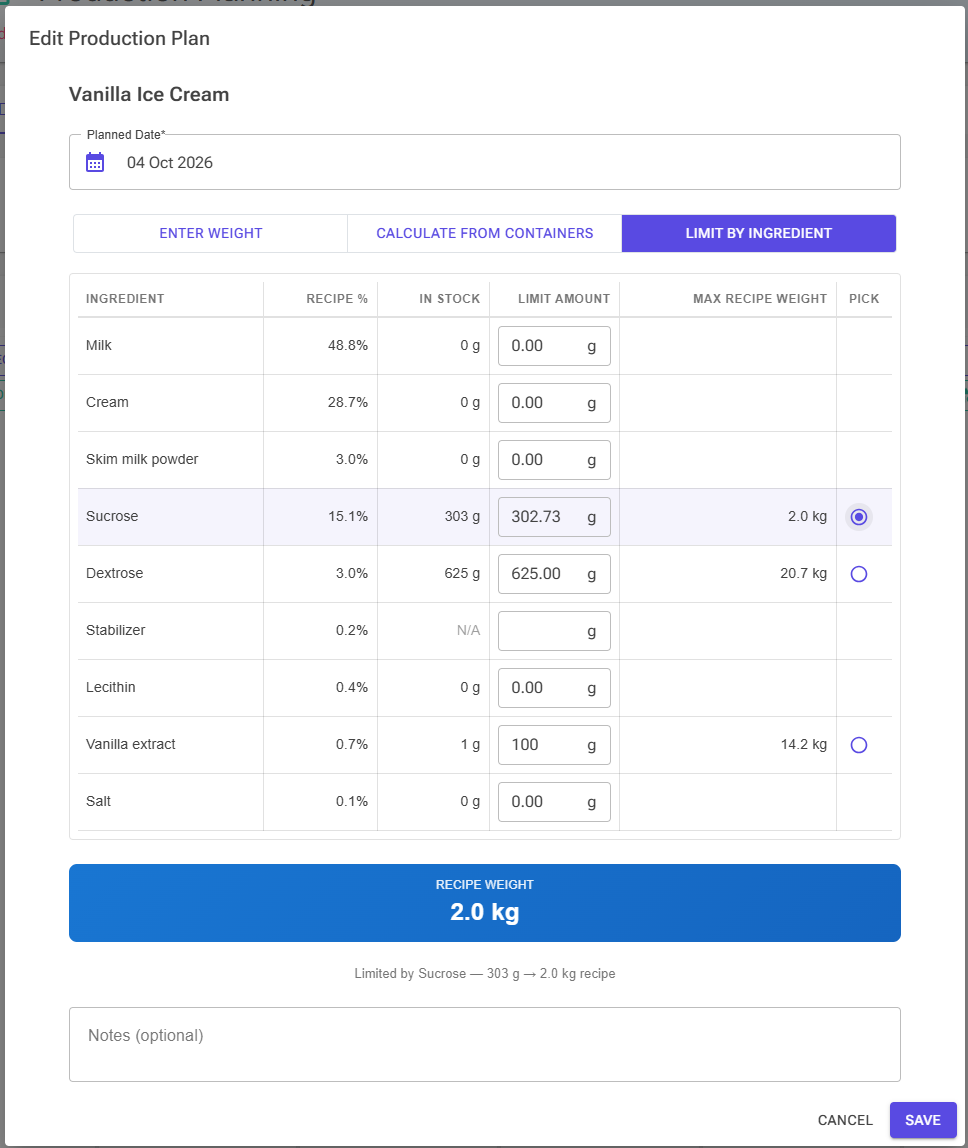
Tip: The calculation uses each ingredient's recipe weight without its waste factor, and In Stock includes any expired lots. If either applies, enter a lower Limit Amount to leave room.
3.4 Fixed Batch Size
Some recipes only work at one size, for example because of a pan, a mould count or a machine. Turn on Fixed Batch Size in the recipe's Properties (Production section). The plan dialog then shows a Fixed Batch Size chip, and saving a plan at any other weight asks you to confirm (Yes, change size). When you plan a product (3.5), such recipes are marked “Fixed batch size — will be scaled”.
3.5 Planning by Product
A product is something you pack and sell, such as “Vanilla 500mL tub”. You define it once under Stock → Products & Packaging → Product Definitions:
- one or more recipes, each with an amount per unit in mL (volume) or g (weight); a two-flavour tub holds two recipes;
- the packaging items used per unit, such as the tub, lid and label.
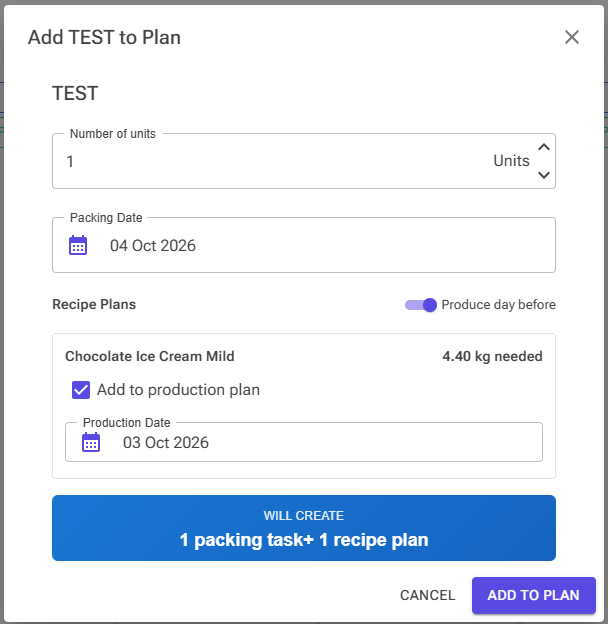
To plan it, click Product on a calendar day, pick the product, and enter the Number of units and the Packing Date. For each recipe, the dialog shows how much mix is needed (“X kg needed”), calculated as in Section 2.2 including evaporation, and proposes a recipe plan:
- Produce day before dates the recipe plans one day before packing. It is on by default, and your choice is remembered.
- If the recipe already has an unproduced plan in the calendar week you are viewing, you can increase the existing plan instead of creating a new one. A summary shows the demand from your other packing cards and whether the existing plan covers it.
- Untick Add to production plan for a recipe you already have enough of.
Add to Plan creates one packing task, shown on the calendar on the packing date, plus the recipe plans. When the ice cream is made, you pack it from the packing task card (see section 6). For product definitions, packaging and product inventory, see Products and Packing.
3.6 Weight-Based vs Volume-Based Products
Each recipe in a product is measured either by volume or by weight per unit, and the mix weight is worked out differently:
| Type | Example | How the mix weight is calculated |
|---|---|---|
| Volume-based (mL, most common) | “Vanilla Cookie 500ml” | The full reverse calculation (inclusions, overrun, density, evaporation) to work out how much mix is needed. |
| Weight-based (g) | “Gelato Tub 1000g” | Simpler: units × grams per unit, converted to kg, then divided by (1 − evaporation) for the plan, because the grams are finished ice cream. No overrun or density calculation is needed. The grams are the ice cream without add-ins. |
4. Ingredient Forecast
The ingredient forecast shows you exactly how much of each ingredient you need for your selected production plans. It scales all ingredient quantities proportionally based on the planned mix weight.
4.1 How Scaling Works
The system calculates a scaling ratio based on your planned quantity relative to the recipe’s mix weight:
Scaling ratio = Planned mix weight / Recipe mix weight
Every ingredient in the recipe (mix ingredients, inclusions and infusions) is multiplied by this ratio and by its waste factor (section 1.6). The ratio is based on mix weight only (excluding inclusions and infusions) because that is what the planned quantity represents.
Example
Your recipe has 1000g mix weight plus 100g chocolate chips (inclusion). You plan to produce 5.0 kg (5000g) of mix:
- Scaling ratio = 5000 / 1000 = 5.0
- Each mix ingredient weight × 5.0
- Chocolate chips: 100g × 5.0 = 500g (also scaled correctly)
- With a waste factor of 1.1 on the chips, the forecast would ask for 550g.
Without waste factors, the forecast total will show 5500g (5000g mix + 500g inclusions) — the total weight of ingredients you need to purchase or have in stock.
💡 Forecast includes everything: The forecast shows all ingredients you need, including inclusions, infusions and the extra from waste factors. While the planned quantity is the mix weight, the forecast correctly shows the full list of what you need to buy and have on hand.
4.2 Expand to Raw Ingredients
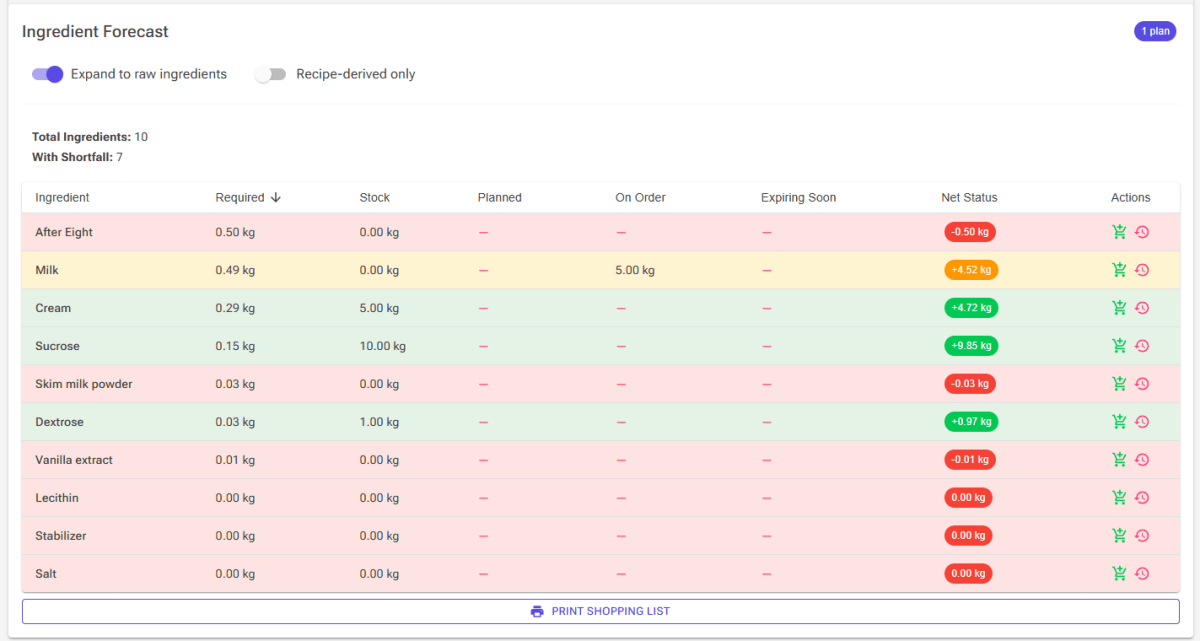
If your recipe uses recipe-derived ingredients (e.g., a praline paste that itself is made from a recipe), the forecast lists each one as a single row. Its Planned column shows what the source recipe's unproduced plans (from today up to the last selected plan's date) will yield after evaporation, so it compares directly with the requirement; it counts towards an amber status.
Toggle the “Expand to raw ingredients” switch to see the full breakdown of what you need to purchase. The forecast first credits the usable stock of the derived ingredient you already have (expired lots excluded). Only the shortfall is broken down into the source recipe's raw ingredients. Derived ingredients inside a source recipe are handled the same way. The Recipe-derived only switch filters the list to derived ingredients. See Using a Recipe as an Ingredient.
4.3 Stock Status Colors
| Color | Meaning |
|---|---|
| Green | Stock on hand covers the full requirement |
| Amber | Short now, but covered by on-order deliveries or planned production |
| Red | Not enough stock, even accounting for orders and planned production |
The Net Status chip shows the projected surplus or shortfall in kg: stock + on order + planned − required.
5. Production (Mark as Produced)
When you produce a batch, the system deducts ingredients from your stock based on the same scaling ratio. The production dialog shows you the ingredient breakdown and current stock levels before you confirm.
5.1 What Gets Deducted
- All mix ingredients are deducted proportionally based on the produced mix weight
- Inclusions are also deducted (they are used from stock even though they are not part of the mix)
- Infusion ingredients are deducted too (they are used during cooking, even though they are removed before churning)
- Each quantity includes the row's waste factor; the Weight column then shows, for example, “500g + 10% waste”.
How the stock is taken:
- Lots are used FEFO (first expiry, first out): the lot that expires soonest goes first, lots without an expiry date last, and expired lots are skipped. Click Adjust lots under an ingredient to choose a different order.
- Tick Zero out on a row to write off what would be left of that ingredient, for example the last of a tub you are discarding.
- An ingredient you don't track yet is added to stock at 0 and marked Auto-tracked.
- A row marked Short does not have enough stock. It is a warning, not a block: the confirm button changes to Produce Anyway.
- If the recipe uses recipe-derived ingredients, the dialog offers Deduct base ingredients of recipe-derived ingredients. Use it when the sub-recipes were not logged as produced: their ingredients are deducted from stock instead of the derived ingredient itself.
For lots, expiry and write-offs, see Stock Management.
5.2 What Gets Recorded
Each batch gets a production log entry. For the example in section 6 (9.9 kg of mix with 5% evaporation):
| Production log entry | Example |
|---|---|
| Quantity Produced (the mix weight you made) | 9.9 kg |
| Actual Yield (after evaporation) | ~9.4 kg |
| Ingredients deducted from stock | All, including inclusions and infusions |
| Available for packing | ~9.4 kg |
The Actual Yield is Quantity Produced × (1 − effective evaporation). It is what appears as available when you pack; Production Details shows it as Produced, Packed and Remaining.
Inclusions are deducted from your ingredient stock, but their weight is not added to the batch yield, because the batch represents the base mix. They are accounted for through the volume calculation when packing: packing asks for less base mix, because the inclusions fill part of each container.
If a batch turned out differently, correct it in the Production Log. Edit Production Details sets the Actual Yield and Waste in kg; the two always add up to the expected weight after evaporation, so evaporation is not counted as waste, and changing one updates the other. Correct quantity fixes a batch logged with the wrong quantity: it rescales the batch's ingredient usage, cost, yield and waste, but does not change your stock. See Production Logging.
5.3 Recipe-Derived Ingredients
If a recipe produces a recipe-derived ingredient (e.g., producing “Vanilla Base” that is used as an ingredient in other recipes), the system automatically adds the batch to the stock of that derived ingredient as a new Produced lot:
- the quantity is the Actual Yield, the weight after evaporation, not the mix weight;
- its cost per kg is the batch's ingredient cost divided by the yield;
- its expiry date is the production date plus the recipe's Best Before days, when the recipe has them.
This is shown in the production dialog as a green row with a factory icon and a Produced chip.
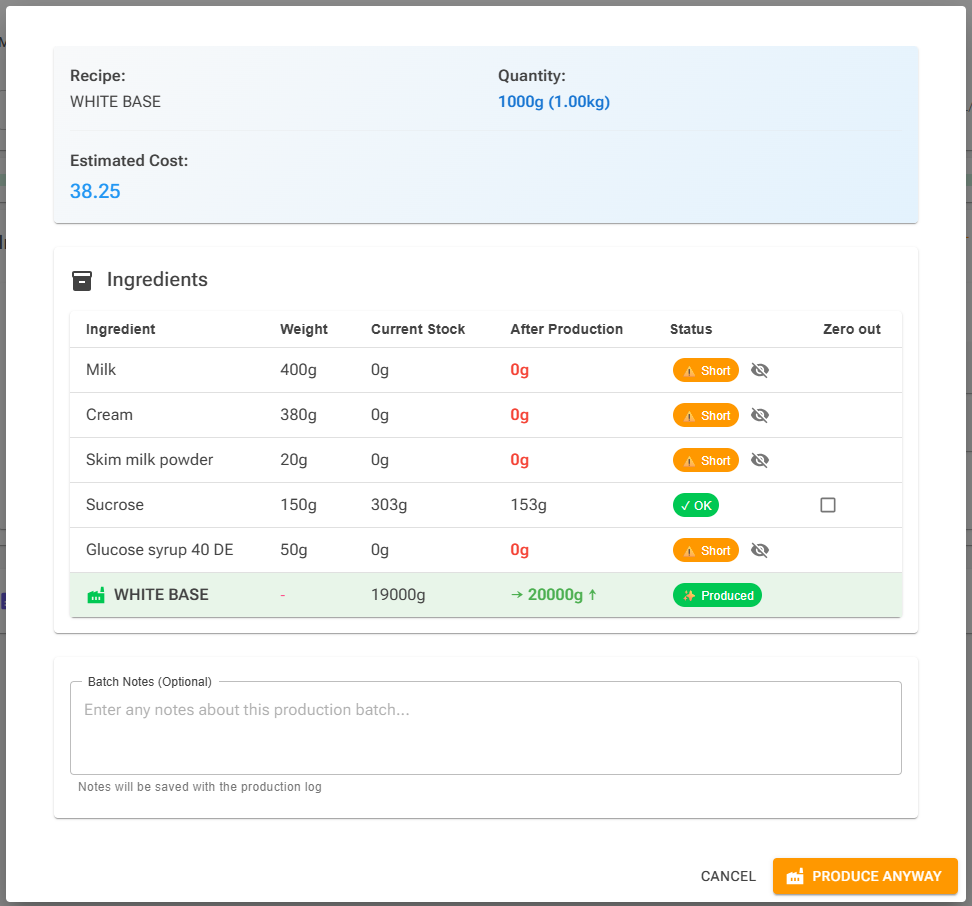
Tip: Produce the derived ingredient (a ripple, sauce or base) before the ice cream that uses it. For example, on Monday produce the ripple and the ice cream base and age the base overnight; on Tuesday churn the base with the ripple and pack. If you produce the ice cream first, the derived ingredient's row shows Short.
6. Packing
6.1 How Much Is Drawn from a Batch
Packing turns produced ice cream into product units. Open Pack Product from a packing task on the planning calendar, or from Product Inventory on the Stock page. For each recipe in the product, the dialog works out the weight needed and lists the batches that still have ice cream left (“Need: … — Selected: …”). The oldest batches are selected first, and you can change the grams taken from each batch.
The weight needed is the post-evaporation weight: the conversion in Section 2.2 without step 5, because evaporation has already happened. For a weight-based recipe it is simply units × grams. If the selected batches don't cover it, the dialog warns “Short by …”.
A batch's remaining quantity is its Actual Yield minus what has been packed or otherwise used. To adjust it:
- Clear remainder (in the Pack Product dialog and on the Production Log row) marks the rest of the batch as used, so it no longer appears as available for packing. The production log entry stays in your records.
- Mark as Used in Production Details records part of a batch used for something else.
6.2 Planning vs Production vs Packing
Planning, production and packing each answer a different question, so their numbers differ slightly — and that is correct:
- 📅 Planning: “How much mix do I need to make?” It works backwards from the containers and reverses the evaporation, giving the pre-evaporation weight.
- 🏭 Production: “What was made?” It records the mix weight and the yield after evaporation.
- 📦 Packing: “How much do I draw from the batch?” It calculates the post-evaporation weight, because evaporation has already happened.
Following one batch: 27 × 500ml tubs of “Vanilla Cookie”, with 50% overrun, 5% evaporation and a density of 1.08 g/mL:
- 27 × 500ml = 13.5 litres of finished product.
- Subtract the inclusion volume (the cookie pieces take up about 0.5 L): about 13.0 litres of churned base.
- Reverse the overrun (÷ 1.5): about 8.7 litres of liquid mix. Apply the density (× 1.08): about 9.4 kg after evaporation.
- Reverse the evaporation (÷ 0.95): about 9.9 kg of mix weight. This is what the recipe plan on the calendar shows, and it drives your ingredient forecast.
6.3 How the Numbers Align
The same batch through the complete cycle:
| Stage | What it calculates | Evaporation? | Result |
|---|---|---|---|
| 📅 Planning | How much mix to weigh out | Reversed (included) | ~9.9 kg mix weight |
| 🏭 Production | What was produced + yield | Applied | 9.9 kg in → ~9.4 kg yield |
| 📦 Packing | How much to draw from batch | Already happened | ~9.4 kg from batch |
Planning tells you to make ~9.9 kg. You produce it, yielding ~9.4 kg after evaporation. Packing draws ~9.4 kg from the batch. Everything adds up.
7. Quick Reference
7.1 Glossary
| Term | Definition |
|---|---|
| Mix Weight | Total weight of base ingredients (excludes inclusions and infusions) |
| Cooked Weight | Mix ingredients not marked Exclude from evaporation |
| Final Weight | Mix weight after evaporation: Mix Weight − Cooked Weight × Evaporation % |
| Effective Evaporation | Evaporation as a share of the whole mix: Cooked Weight × Evaporation % ÷ Mix Weight |
| Mix Volume | Volume of the liquid mix: Final Weight / Density |
| Ice Cream Volume | Volume after churning: Mix Volume × (1 + Overrun %) |
| Displacement | Volume (mL) that 100 g of an inclusion occupies. Set per ingredient, overridable per recipe; estimated from composition when not set. |
| Inclusion Volume | Physical volume of add-ins: Inclusion Weight × Displacement ÷ 100 |
| Product Volume | Total final volume in container: Ice Cream Volume + Inclusion Volume |
| Overrun | Percentage of air added during churning. Set per recipe; otherwise the Settings default. |
| Density | Weight per volume of liquid mix (g/mL). Calculated automatically; fat lowers it, non-fat solids raise it. |
| Evaporation | Percentage of the cooked ingredients' weight lost as water. Set per recipe. Usually 0% in a closed pasteurizer. |
| Waste Factor | Per-row Scale factor (1.1 = 10% extra) added to forecasts and stock deduction |
| Infusion | Ingredient steeped and removed (vanilla pod, tea). Deducted from stock, not part of the finished product. |
| Planned Quantity | The mix weight (kg) in a production plan. This is what you weigh on your scale. |
| Actual Yield | The batch weight after evaporation; what packing draws from |
| Packing Task | A calendar card for packing a number of product units on a date |
| Recipe-Derived | An ingredient produced by another recipe (e.g., praline paste, vanilla base). |
7.2 Key Formulas
| What You Want | Formula |
|---|---|
| Final Weight from Mix Weight | Final Weight = Mix Weight − Cooked Weight × Evaporation % = Mix Weight × (1 − Effective Evaporation) |
| Effective Evaporation | = Cooked Weight × Evaporation % ÷ Mix Weight |
| Density | = 1 ÷ (Fat ÷ 0.9 + Non-fat solids ÷ 1.58 + Water) |
| Mix Volume from Final Weight | Mix Volume = Final Weight / Density |
| Ice Cream Volume from Mix Volume | Ice Cream Volume = Mix Volume × (1 + Overrun %) |
| Inclusion Volume (mL) | = Σ Inclusion Weight (g) × Displacement ÷ 100 |
| Product Volume (total) | Product Volume = Ice Cream Volume + Inclusion Volume |
| Inclusion share | = Inclusion Volume ÷ Product Volume (of the recipe) |
| Mix Weight from Product Volume (planning) | = Product Vol × (1 − Inclusion share) / (1 + Overrun) × Density / (1 − Effective Evaporation) |
| Weight drawn from a batch (packing) | = Product Vol × (1 − Inclusion share) / (1 + Overrun) × Density |
| Ingredient scaling ratio | Ratio = Planned Mix Weight / Recipe Mix Weight |
| Ingredient quantity (forecast and deduction) | = Recipe Weight × Waste Factor × Ratio |
| Actual Yield | = Quantity Produced × (1 − Effective Evaporation) |
| Largest batch (Limit by Ingredient) | = Limit Amount ÷ Recipe % |
Related Articles
- Production Planning — The planning calendar, plans and work orders
- Production Logging — Producing batches and the Production Log
- Stock Management — Lots, FEFO and stock deduction
- Products and Packing — Product definitions, packaging and product inventory
- Recipe Weights, Scaling & Evaporation — Evaporation and scaling in the Recipe Editor
- Using a Recipe as an Ingredient — Recipe-derived ingredients
- Volume Estimator — Measuring displacement and estimating volume