What Ingredient Packs Are
Ingredient Packs are curated collections of branded and specialty ingredients, for example one manufacturer's product range. Instead of creating each ingredient yourself, you import the pack in one step and get your own copy of every ingredient in it, ready to use in your recipes.
Open Ingredient Packs from the navigation menu, just below Ingredients. You can also add an Ingredient Packs shortcut to your Home page.
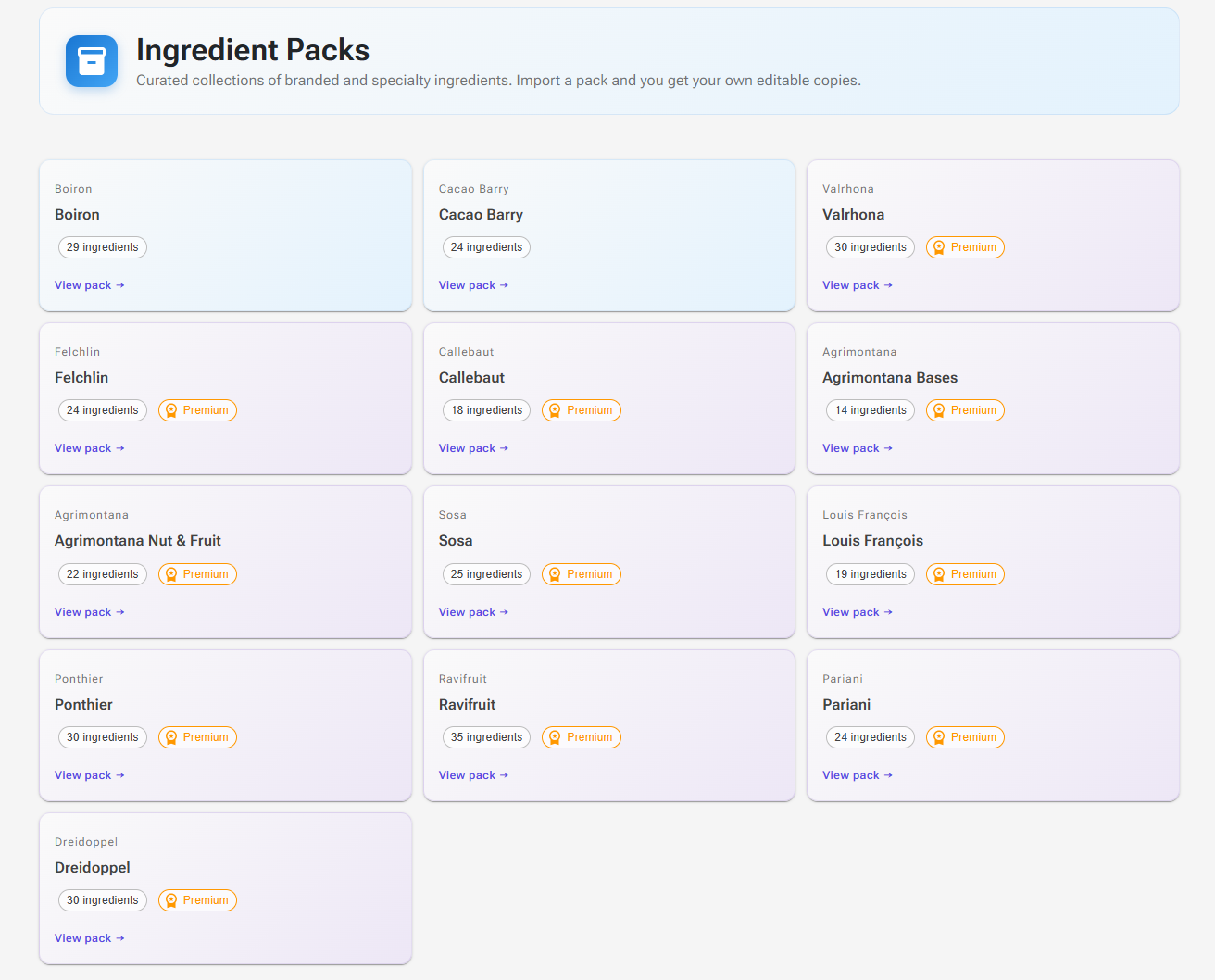
Browsing Packs
Each tile shows the brand, the pack name and a few chips:
| Chip | Meaning |
|---|---|
| n ingredients | How many ingredients the pack contains. |
| Premium | Importing this pack needs a Premium plan. Packs without this chip are free to import. |
| Imported | You have imported the pack at its current version. |
| vn available | You imported an earlier version, and the pack has been updated since. |
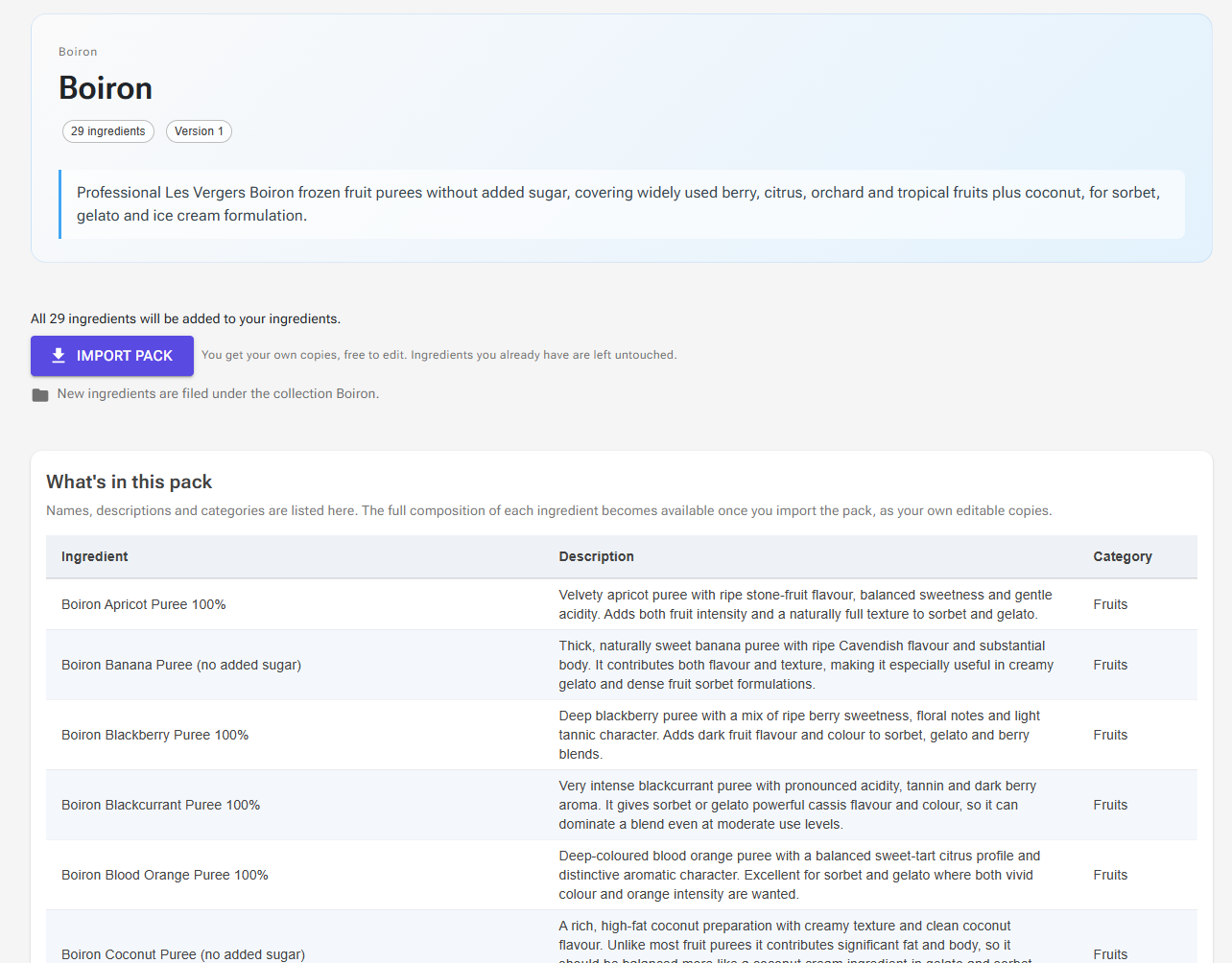
Click a tile to open the pack page. It shows the pack's version, its description, and a What's in this pack table with each ingredient's name, description and category. The full composition of each ingredient becomes available once you import the pack, as your own copies.
Anyone can browse packs, including guests. Importing needs an account: a guest sees the note "You're browsing as a guest", and pressing Import asks you to create an account first.
Importing a Pack
- Sign in and open the pack page.
- Read the line above the button. It says what the import will do, for example that all ingredients will be added, or that some of them you already have and they will be left alone.
- Click Import pack.
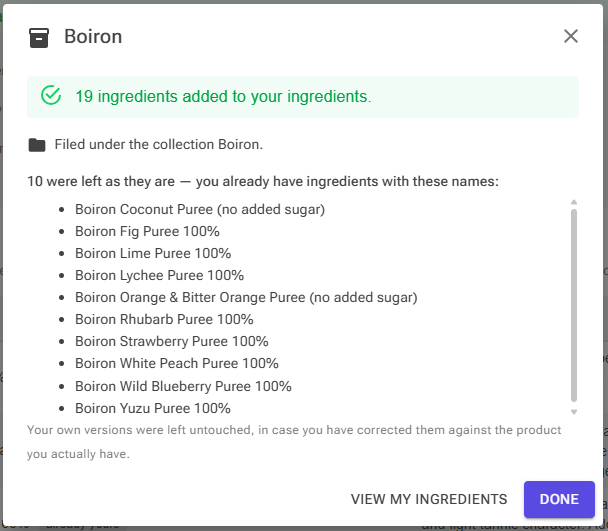
- A summary dialog lists what was added, what was left as it was, and the collection the new ingredients were filed under. Click View my ingredients to see them, or Done.
If the pack has the Premium chip and you are on the Free plan, the import stops and the upgrade dialog opens instead. Free packs can be imported on any account.
What You Get
- Your own copies. Each pack ingredient becomes one of your personal ingredients. You can edit it like any ingredient you created yourself, for example to match the data sheet of the batch on your shelf.
- A collection named after the pack. The new ingredients are filed under an ingredient collection with the pack's name, so you can find them with the Collections filter on the Ingredients page. The pack page tells you the collection name before you import.
- No cost. Packs do not carry prices. Enter your own Cost per Kg on each ingredient, as you would for any other ingredient.
Ingredients You Already Have
The import compares the pack with your own ingredients by name, ignoring upper and lower case. An ingredient whose name you already have is marked already yours in the contents table, and the import leaves your version exactly as it is. It is never overwritten silently, in case you have corrected it against the product you actually have.
Only your own ingredients count. A shared library ingredient with the same name does not stop the pack's version from being added, so you may see both in the ingredient list.
When you already have everything in the pack, the button reads Import again, and the summary says that nothing needed importing.
Pack Versions and Updates
Packs are updated from time to time, for example when a manufacturer changes a product. After an update, the pack's tile shows vn available, and the pack page says which version you imported and which version the pack is now.
If any of the ingredients you already have differ from the new version, they are marked update available in the contents table, and the button reads Review updates (or Import pack, when the pack also has new ingredients for you).
Reviewing Updates
Importing then opens the Update your ingredients? dialog:
- Each changed ingredient is listed with the fields that differ, and all of them start ticked.
- Untick any ingredient you have corrected yourself and want to keep.
- Click Update n ingredients to apply the ticked ones, or Skip updates to leave them all as they are. New ingredients in the pack are added either way.
- Closing the dialog without choosing cancels the whole import.
As the dialog warns, updating replaces the composition, description, category and allergens of your copy with the pack's. Your cost, stock and label sub-ingredients are kept, and so is the ingredient's name. Updated ingredients are also filed under the pack's collection.
If you have made a recipe into an ingredient and its recipe uses an updated ingredient, that recipe-derived ingredient is recalculated as well. See Using a Recipe as an Ingredient.
Removing Pack Ingredients
There is no uninstall. Once imported, the copies are ordinary personal ingredients, with no further link to the pack. To remove them, delete them on the Ingredients page as you would any other ingredient.
Deleting the pack's collection does not delete its ingredients, only the collection.
Tip: Because the import matches by name, renaming a pack ingredient makes it unknown to the pack. A later import adds the pack's version again under the original name. The same happens if you delete an ingredient and import the pack again.
Accuracy of Pack Data
Pack data is compiled from publicly available sources such as manufacturer specifications and product labels. Every effort is made to keep it accurate, but values may change or contain errors. Check imported ingredients against the manufacturer's current documentation before you rely on them, for example for a label or for costing.
Troubleshooting
Problem: I imported a pack but some ingredients were not added.
Solution: You already had ingredients with those names. The summary lists them under "left as they are". Your versions were not changed.
Problem: The pack ingredients show a cost of zero in my recipes.
Solution: Packs do not include prices. Enter the cost per kg you pay on each ingredient.
Problem: I can see the pack but the import asks me to upgrade.
Solution: The pack has the Premium chip. Premium packs can only be imported on a Premium plan; packs without the chip are free.
Problem: I cannot find the imported ingredients.
Solution: On the Ingredients page, select the collection with the pack's name under Collections, or search for an ingredient by name.