The Real Problem With Adding an Ingredient
A nutrition label tells you the macros — fat, sugars, protein, salt — but never what ice cream actually needs: PAC (freezing power), POD (sweetening power), MSNF, and how the fat and solids are distributed. The import tools in Ice Cream Calculator bridge that gap by estimating the missing ice-cream data from the macros you give them.
The catch is that the bridge is approximate. The macros are facts from a label; the PAC, POD, and MSNF the app fills in are educated guesses. So the real skill isn't clicking an import button — it's choosing the right method for what you have, then verifying the result. This tutorial covers the methods, shows the workflow on two examples, and then gives you a type-by-type guide so you can look up your ingredient and see exactly what matters for it.
New to these terms? This tutorial assumes you know what PAC, POD, MSNF, and Total Solids mean. If not, read the Ingredients reference first — it defines every property and field. This article is the practical companion to it.
How Much Detail Do You Actually Need?
Before you start, a liberating truth: you rarely need every field perfect. How much detail and accuracy an ingredient deserves depends on two things — what you use the app for, and how the ingredient is used in the recipe.
- Your purpose. If you run a commercial business and print nutrition labels, the full panel (saturated fat, fibre, sodium, vitamins, allergens) needs to be right. If you're a home user dialling in texture, the label fields barely matter.
- The ingredient's weight in the recipe. Something used in tiny amounts — a stabiliser at 0.3%, a few drops of extract — has almost no effect on the totals, so a rough entry is fine. Something used in bulk — milk, cream, sugar — drives everything, so it's worth getting right.
That gives you two working levels:
- Basic (most users, most ingredients): get Total Solids, fat, and PAC/POD right. That's enough to balance and freeze correctly.
- Advanced (label generation): get all nutrients right, because they appear on the printed label.
So as you work through the methods below, scale your effort to the ingredient. Don't agonise over the sub-nutrients of a 0.2% stabiliser; do take care with your main dairy and sugars.
The Methods — Pick by What You Have
The right method follows from the information you already hold, not from which button looks interesting. Create an ingredient with Add New on the Ingredient Library page, then use the Import Actions card at the top of the editor.
- It's already in the library → just search and use it. The library ships with hundreds of ready ingredients that already carry full ice-cream data.
- You have a database match (a generic whole food — milk, cream, egg yolk, a fresh fruit, a syrup) → Food Database, or the Food DB Search button on the library toolbar. The dialog searches USDA FoodData Central and the German BLS database; the BLS tab carries the sugar split on almost every food. See USDA Database.
- You have a product label (a branded, packaged product) → Nutrition Label.
- You only have a name or description → AI Assistant, which estimates a full profile including PAC/POD. It's the most capable method — especially for composite products that span several categories — but it's a Premium feature. (See composite ingredients for what to do without it.)
- It's your own base, sauce, or variegate → build it as a recipe, then use From Recipe to turn it into an ingredient.
- It's close to something that already exists → use the Copy action on the library row to make a personal copy, then modify it.
- You know all the numbers → Add New and enter them manually on the Properties tab.
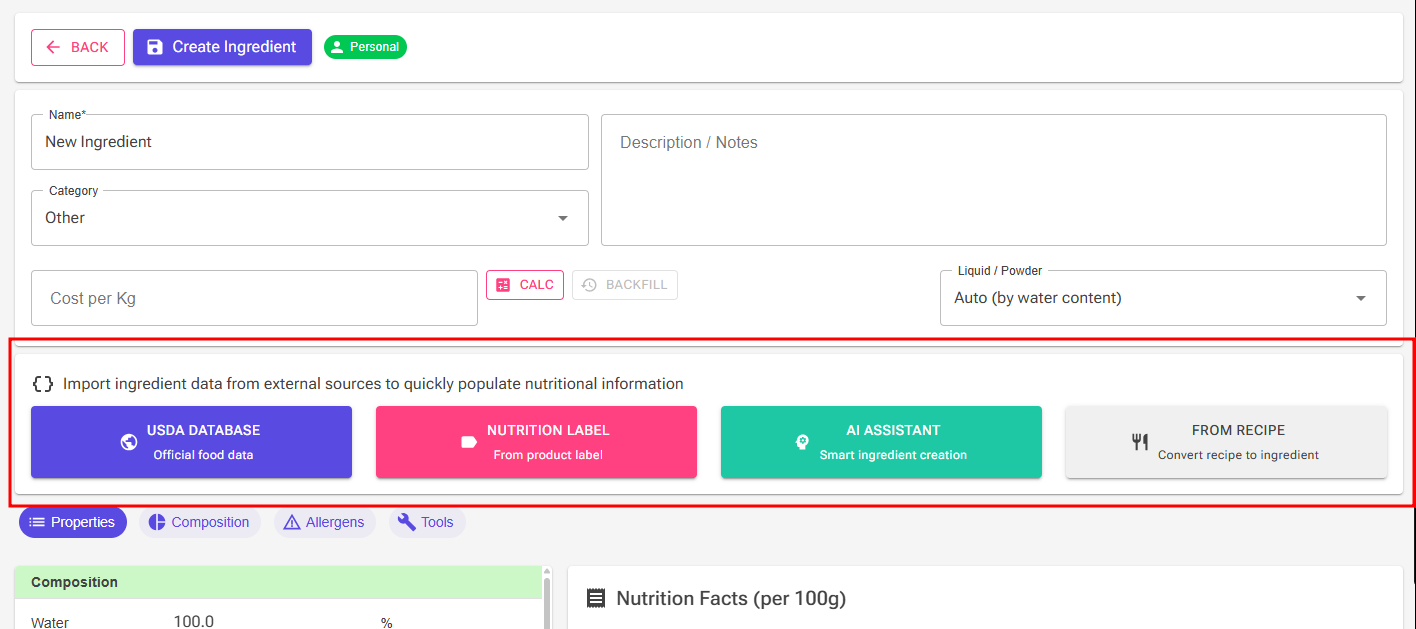
Whichever method you use, the result lands in the same editor. The Properties tab holds every value, the Composition tab shows how solids break down, and the PAC/POD calculator (the calculator icon beside the PAC field) is where you fix the numbers a label can't give you. The type-by-type guide below tells you which of these matters for each kind of ingredient.
Two Quick Walkthroughs
Walkthrough 1 — A dairy ingredient via USDA
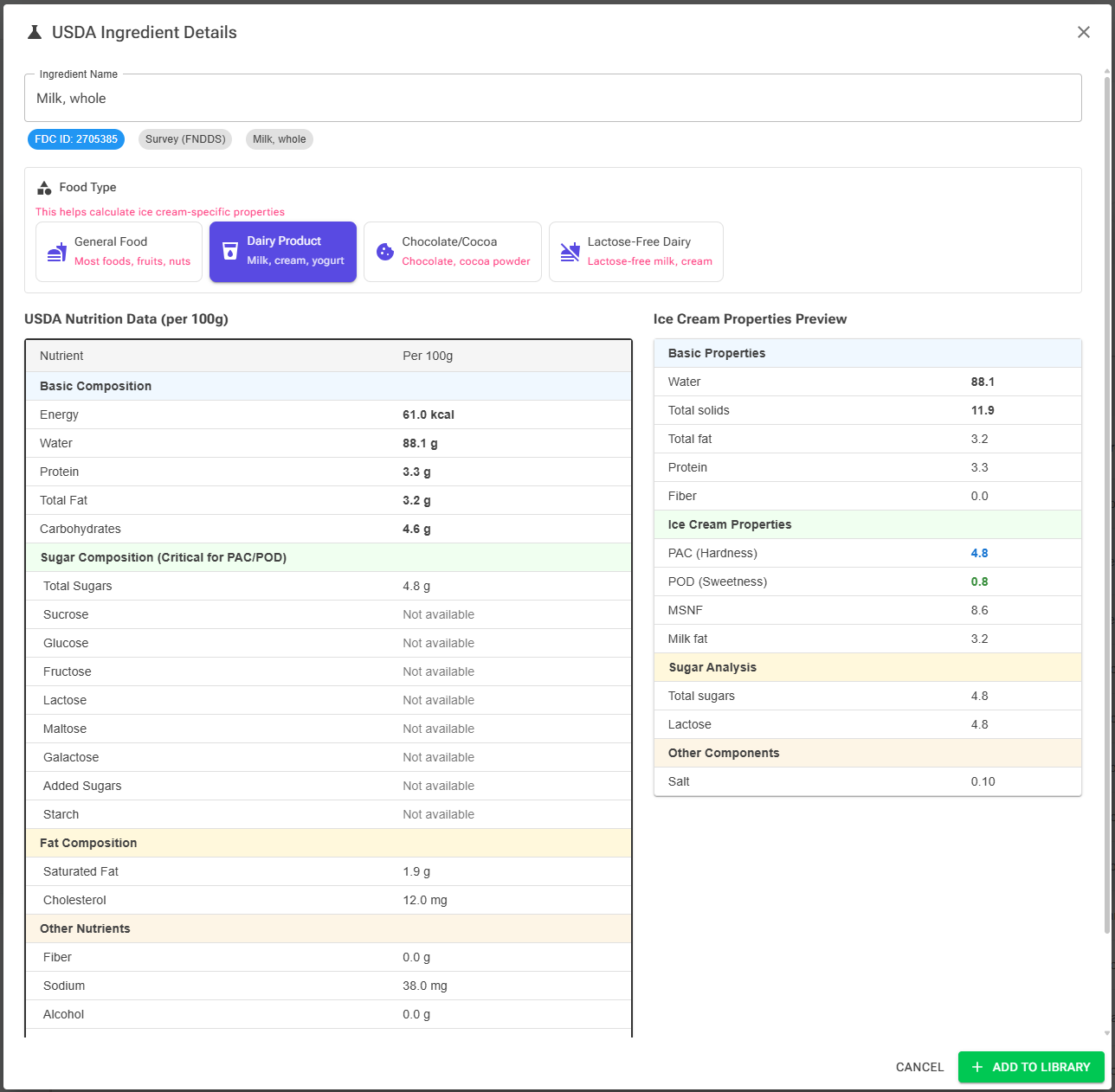
The easy case. To add whole milk — a generic whole food with clean USDA data:
- On the Ingredient Library page, click Food DB Search (or Add New, then Food Database).
- Search on the BLS (DE) or a USDA tab, pick the closest match, and set the food type to Dairy — this tells the app to apply MSNF and milk-fat handling.
- Preview the calculated PAC, POD, and MSNF, then add it to your library.
- Open the ingredient and sanity-check the Properties tab: Milk Fat (whole milk ≈ 3.2–3.8%) and MSNF (≈ 8.5–9%) should look right.
For a clean USDA whole food these come out fine — which is exactly why USDA is the easy path.
Walkthrough 2 — A packaged product via Nutrition Label
A harder case: a branded product with a printed panel and no clean USDA entry — say a sweetened condensed milk, or a cookie crumb you'll use as an inclusion.
- In the editor, click Nutrition Label.
- Enter the label values (the dialog handles EU per-100g and US per-serving).
- Set the food type (Dairy, Chocolate, General…). This is the step people skip, and it's the one that makes the estimates fire correctly — the wrong food type gives the wrong MSNF and PAC.
Then run the same three checks every time — see Verify Before You Trust It below. The one that surprises people first is Total Solids:
Total Solids & the Other Solids fallback
After any import you get the macros — fat, sugars, protein — but not the odds and ends: ash, minerals, unidentified carbs, rounding. Other Solids is the catch-all that absorbs all of that and reconciles the components against Total Solids, so a small mismatch warning right after import is normal, not a mistake. On the Composition tab the Total Solids Breakdown shows the gap and offers two fixes — and the insight is that they're a choice:
- Calculate Other Solids — keeps Total Solids as stated and pushes the difference into Other Solids. Use when you trust the stated total (e.g. a spec sheet's Total Solids or water content).
- Recalculate Total Solids — trusts your component entries and rebuilds Total Solids from them, shifting Water to keep 100%. Use when you trust the individual values more than the stated total.
The decision in one line: which do you trust more — the total, or the parts? Trust the total → Calculate Other Solids. Trust the parts → Recalculate Total Solids.
Adding Ingredients by Type
This is the part to bookmark. Find your ingredient below, note the best method, and read what matters — the one or two things that decide whether the import is trustworthy. The tricky families have a detailed note underneath the table.
| Ingredient type (examples) | Best method | What matters most |
|---|---|---|
| Standard dairy — milk, cream | USDA / library | Milk Fat and MSNF look sane |
| Milk powders & concentrated dairy — SMP, condensed milk | Nutrition Label / USDA | High lactose → crystallisation risk; low water |
| Plain sugars — sucrose, dextrose, fructose, lactose | Library / Copy | Usually already exist; PAC/POD already set |
| Syrups — glucose, corn, maple, honey, agave, sirap, invert | Food Database, BLS tab (has the split) / Nutrition Label + Sugars tab | The sugar composition (see note) |
| Fruits & berries, purées | Food Database — BLS (has the sugar split), USDA (sometimes) / Nutrition Label | Fructose-led; water/concentration |
| Chocolate & couverture | Nutrition Label (type Chocolate) / Copy | Cocoa fat + solids close to cocoa %; HF |
| Cocoa powder | Nutrition Label / Food Database | Declared fat = Cocoa Fat; the rest = Cocoa Solids |
| Nut & seed pastes — pistachio, hazelnut, tahini | Nutrition Label | Total Fat right; it's "other fat" → raises HF |
| Fats & oils — butter, coconut oil, vegetable oil | USDA / library | Milk Fat vs other fat split |
| Eggs & yolks | USDA / library | Fat, protein, and emulsifying lecithin |
| Stabilisers & emulsifiers | Copy from library / manual | Put the value in the Stabiliser/Emulsifier field |
| Commercial bases & neutro | AI Assistant / manual | S/E fractions of the blend; dosage scaling |
| Alcohol — liqueurs, spirits | Nutrition Label + Alcohol tool | vol% → weight%; add alcohol PAC; sugar in sweet liqueurs |
| Sugar-free — polyols, high-intensity sweeteners | Nutrition Label + PAC/POD calculator | Polyols in the Sugar Alcohols field; HIS = big POD, tiny PAC |
| Dried & concentrated — raisins, dried fruit | USDA / Nutrition Label | Low water, high solids — don't apply a "fresh" profile |
| Inclusions — cookie pieces, candy, chocolate chips | Nutrition Label | Set the Displacement value (for overrun), not just composition |
| Composite / multi-category — chocolate-chip cookie, candy bar | AI Assistant (Premium), or From Recipe / Nutrition Label + manual split | No single food type fits; split the fats by hand |
| Flavourings & extracts — vanilla extract, flavour pastes | Nutrition Label / AI Assistant | Often alcohol-based; treat as a Flav ingredient |
| Your own bases, sauces, variegates | From Recipe | Build the recipe first; values auto-calculate |
The straightforward ones
Standard dairy, plain sugars, fats and oils, and eggs rarely need special handling. Most already exist in the library — search first. If you do create one, USDA gives clean data, and the only check is that the fat split (Milk Fat vs other fat) and, for dairy, MSNF look reasonable. Everything below is where judgement starts to matter.
Syrups — the hardest family
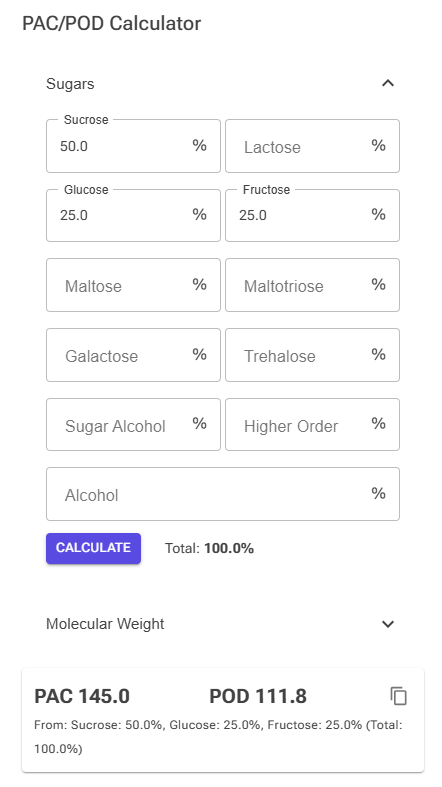
"Syrup" hides three different families that pull PAC and POD in different directions. Import the macros with Nutrition Label, then open the PAC/POD calculator and enter the sugar split below (as proportions of the sugar fraction). These are reasonable starting points — prefer a manufacturer spec sheet when you have one.
| Syrup | Approx. sugar split | Effect |
|---|---|---|
| Simple sugar syrup | ~100% sucrose | Reference |
| Golden syrup / treacle | ~45% sucrose, ~28% glucose, ~27% fructose | Higher PAC & POD |
| Molasses (melass) | Mixed, lower total sugar, high minerals | Lots of other solids |
| Glucose syrup, high DE (~60+) | mostly glucose + maltose | High PAC, modest sweetness |
| Glucose syrup, low DE (~30–40) | more maltotriose + higher-order | Low PAC, more body |
| Corn syrup (majssirap) | DE-dependent, no fructose | As glucose syrup of matching DE |
| HFCS / fruktossirap | ~42–55% fructose, rest glucose | High PAC & POD |
| Maple syrup (lönnsirap) | ~90% sucrose; ~66% total sugar | Near sucrose; mind the water |
| Honey | ~40% fructose, ~35% glucose, small sucrose | High PAC & POD |
| Agave | ~70–90% fructose | Very high PAC & POD |
| Brown rice syrup / rismalt | ~50%+ maltose, glucose; no fructose | Moderate PAC, low sweetness |
Glucose/corn syrups live on the DE spectrum: high DE leans Glucose/Maltose (higher PAC), low DE leans Maltotriose/Higher Order (more body) — and contain no fructose unless isomerised. Invert sugar is rarely 100% inverted: assume ~85–95%, splitting most sugar evenly between Glucose and Fructose with a little residual Sucrose. See Glucose and Dextrose Explained.
Fruits, berries & purées
Fruit sugar leans fructose (roughly fructose + glucose + a little sucrose), so real PAC and POD run higher than a "same Total Sugars as sucrose" guess. Stone fruits and grapes are especially fructose-heavy; bananas carry more sucrose. USDA often returns the sugar breakdown for fresh fruit — when it does, you're done. When it doesn't, estimate the split in the PAC/POD calculator. Purées and concentrates also carry a lot of water, so confirm Water/Total Solids reflects the concentration.
Chocolate & cocoa
Here the hard part isn't sugar — it's the fat and solids split, which drives the Hardening Factor. Cocoa Fat + Cocoa Solids must add up to the stated cocoa %, and HF weights cocoa solids most. Use Nutrition Label with the food type set to Chocolate, or Copy a close existing chocolate. For cocoa powder, enter the declared fat as Cocoa Fat and the rest as Cocoa Solids. Then expect to add PAC (sugars) to offset the hardening — see the chocolate properties and HF sections.
Nut & seed pastes
Pistachio, hazelnut, almond, tahini, peanut — very high fat, little or no sugar. The Nutrition Label method is best here: a label gives the fat and protein cleanly, and the food type fills the rest. That fat is "other fat," which raises HF and firms the ice cream, so get Total Fat right and leave Milk Fat and Cocoa Fat at zero. Treat these as flavour ingredients in balancing (the Flav class — see Balancing).
Alcohol-containing ingredients
Liqueurs and spirits are hard because alcohol has an enormous freezing-point effect and the label states % by volume, not weight. Import with Nutrition Label, then use the Alcohol tool to convert vol% to weight% — alcohol PAC is added on top of the sugar PAC. Many liqueurs are heavily sweetened, so set the sugar too, or its PAC/POD won't be counted.
Sugar-free — polyols & high-intensity sweeteners
Polyols (maltitol, erythritol, sorbitol) have their own PAC/POD, different from sugars — enter them in the calculator's Sugar Alcohols field, not as sugar. High-intensity sweeteners (stevia, sucralose) contribute almost no PAC but huge sweetness, so a tiny weight change swings POD enormously; the HIS class in balancing exists for exactly this.
Commercial bases & neutro
"Base 50/100/150" and "Neutro 5/10" are blends dosed at a known rate — the number is the dosage. Their stabiliser/emulsifier content scales inversely with the dosage, so a low-dose neutro is highly concentrated. Enter the stabiliser and emulsifier fractions of the blend, not the delivered amount; the recipe handles the dilution. The AI Assistant recognises these naming conventions and is often the fastest route.
Inclusions
Cookie pieces, candy, chocolate chips, brownie chunks — added as pieces, not dissolved. Import with Nutrition Label, but the property that matters most for these is Displacement (mL per 100g), which the overrun calculation uses. Set it from the Physical Properties section rather than relying on density.
Composite ingredients that span categories (and what to do without AI)
Some products don't fit one box. A chocolate-chip cookie has dairy (butter), sugars, and chocolate; a filled candy bar mixes milk fat, cocoa fat, and several sugars. This is the hardest case for every method except one, because the food-type selector applies a single category's rules — pick Dairy and the cocoa fat/solids come out wrong; pick Chocolate and the milk fat comes out wrong.
The AI Assistant handles these well because it reads the whole ingredient list and splits the fats and sugars across categories for you — but it's Premium. If you don't have it, you have two good routes:
- Build it From Recipe (best when you know roughly what's in it). A cookie is really flour + butter + sugar + chocolate chips + egg — each a clean, single-category ingredient you can add by its own best method. Build a quick recipe from those, then use From Recipe to turn it into an ingredient. The app calculates the composite correctly, fat split and all, with no guesswork on your part.
- Nutrition Label + a manual split. Import the macros with Nutrition Label (food type General), then use the product's ingredient list to split the fat by hand on the Properties tab — estimate Milk Fat from the dairy content and Cocoa Fat / Cocoa Solids from the chocolate content, leaving the rest as other fat. Estimate the sugar composition in the PAC/POD calculator the same way.
And remember how much detail you need: inclusions like this are usually a small fraction of the mix, so an approximate split is perfectly fine. Reserve the careful work for the ingredients that make up the bulk of your recipe.
Your own recipes
For a base, sauce, variegate, or swirl you make yourself, build it as a recipe first, then use From Recipe to convert it into an ingredient. Its values are calculated from the recipe and update when the recipe changes, so you never hand-enter the composition.
Verify Before You Trust It
The single habit that separates a usable ingredient from a misleading one is treating verification as part of the import, not an afterthought. Every time you add something:
- Import the macros with the right method and food type.
- Check PAC / POD on the Properties tab; fix the sugar composition in the calculator if needed.
- Check Total Solids on the Composition tab; choose Calculate Other Solids or Recalculate Total Solids.
- Resolve warnings — clear any validation icons (the validation section explains each).
Do that and the approximate bridge becomes a reliable one. Skip it and a single wrong food type or unbalanced solids figure will quietly distort every recipe the ingredient touches.
Related Articles
- Ingredients — the full reference for every field and property
- Glucose and Dextrose Explained — DE values and syrup behaviour in depth
- Balancing — using your ingredients in a recipe