Think of Them as Playlists
A collection is a named group of recipes or ingredients that you put together yourself. The easiest way to think of it is as a playlist in Spotify or any other music app.
- One item, many collections. A song can be on several playlists at once, and a recipe or ingredient can be in several collections at once.
- Removing is not deleting. Taking a song off a playlist doesn’t delete the song, and deleting a whole playlist leaves all its songs in your library. Collections work the same way: your recipes and ingredients are never deleted with them.
- Your names, your rules. You name each collection and decide what goes in it. Your collections are your own; nobody else sees them.
There are two kinds: recipe collections and ingredient collections. Ingredient collections can hold your own ingredients as well as shared library ingredients.
Collections, Categories and Tags
A recipe’s category and tags describe what it is: a Gelato, a Sorbet, Vegan, Low Sugar. You pick them from fixed lists, so they mean the same thing for everyone.
Collections describe how you work with your recipes and ingredients: which menu a recipe belongs to, which customer it is for, or whether it is still being tested. The names are entirely yours. Categories, tags and collections work well together; a Vegan Sorbet can sit in your “Summer menu” collection and in “Café Roma”.
Ideas for Recipe Collections
- Menus and seasons – “Summer menu”, “Christmas 2026”, “Weekend specials”.
- Customers and shops – one collection per café, restaurant or shop you make ice cream for.
- Product lines – “Gelato pans”, “Pints”, “Ice cream cakes”.
- Stages of work – “Testing” for recipes you are still developing, “Approved” for the ones that are ready for production.
Ideas for Ingredient Collections
- Suppliers – everything you buy from one supplier, so you can find it quickly when you order.
- What you keep in stock – the ingredients that are actually on your shelves, as opposed to the whole library.
- One production line – the bases, sugars and stabilizers you use for your gelato, or for your vegan range.
- Ingredient packs – when you import an ingredient pack, its ingredients are put in a collection named after the pack automatically.
Where Collections Help
Once you have a few collections, they show up wherever you look for recipes and ingredients:
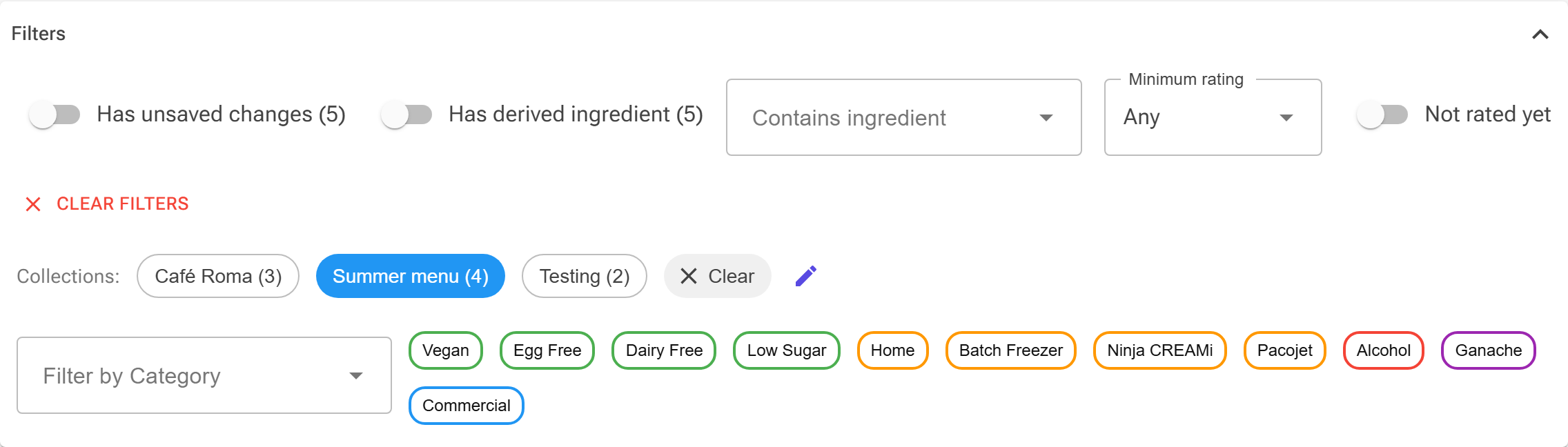
- Recipes and Ingredients pages – select a collection to see only what is in it. Select several, and you see everything that is in any of them. This is also where you create, rename and delete collections. See Recipes and Ingredients.
- Picking ingredients – when you add an ingredient to a recipe, you can narrow the list to one of your ingredient collections.
- Picking recipes – tools that ask you to choose recipes can filter by your recipe collections too.
- Ingredient Usage – build a list of the ingredients a group of recipes uses, and save it as a new ingredient collection. See Tools Overview.
- REST API – read and manage your collections from your own systems. See the REST API Reference.
Tips
- Don’t worry about choosing the one right collection for a recipe. Put it in every collection where it makes sense, as you would with a song.
- Combine a collection with search and the other filters, such as category or tags on the Recipes page, to narrow your list down further.
- Start small. Two or three collections that match how you already work are more useful than a long list you have to maintain.